Latest Updates
Who's Online

Please sign in to add comments


Cart Contents
| Item: | Price: | Qty: |
|---|---|---|
| Total: R 0.00 | ||
User Content
Latest Poll
Review
Review: Razer Naga V2 HyperSpeed
Snake charmer.

If you've read our previous Razer reviews on the Viper V2 Pro or the DeathAdder V2 X HyperSpeed, you know that the company is always at the top of their game when it comes to some of the most premium mice on the market (often accompanied by large price tags). The Naga V2 HyperSpeed is no different, boasting an impressive and extremely versatile mouse with the appropriately expensive asking price - but above all, it's a gamer's dream.
First and foremost, here's all the specs for the Razer Naga V2 HyperSpeed:
Size: 119.5 mm x 75 mm x 43.5 mm
Size (inches): 4.70" x 2.96" x 1.72"
Ambidextrous: No
Weight: 95/118 g
Number of Buttons: 20 (including wheel click)
Main Switches: Razer Mechanical Switches Gen-2 (60 M)
Wheel Encoder: Optical
Sensor: Focus Pro 30K (PixArt PAW3950)
Resolution: 100–30,000 CPI
Polling Rate: 125/500/1000
Cable: n/a
Software: Yes

I usually don't spend much time taking about the packaging of any tech product but I have to give credit to Razer's creative packaging for the Naga V2 HyperSpeed. It unfolds like an origami box and putting it back together after my review period was done was a puzzle in and of itself (though it may have been due to my tired state at the time).
Inside the box, you get the mouse, a battery, a USB wireless dongle, a pamphlet, a Razer sticker and a pouch for the mouse. The most notable thing you'll first notice on the Naga V2 HyperSpeed is its design. Sporting a black aesthetic with Razer's subtle logo embellished on the palm rest (no RGB), the mouse also sports a sleek, extraordinarily comfortable frame that rests perfectly in your hands. Beside it is a set of 12 additional programmable buttons, but we'll get to that in a bit. DPI Stage Up and Down buttons are also located on the top left for easy access.
If you're using the mouse for a good balance of gaming and business, you'll easily be able to last an entire month on one good set of batteries.
I put it through the ringer to find out if Razer's marketed 200+ hours of battery life on HyperSpeed Wireless was true and while I didn't get that far, after 80+ hours, it certainly lived up to the hype. Keep in mind, those hours were a combination of gaming and mostly using the mouse for work and general purposes. If you're using the mouse for a good balance of gaming and business, you'll easily be able to last an entire month on one good set of batteries which is commendable. Those using it for excessive gaming during the day and night might shorten its battery lifespan, but not by much.

As for the programmable buttons, the Naga V2 HyperSpeed features around 20 controls including its 12-button thumb grid. The wheel comes equipped with two options: Tactical Cycling Mode or Free-Spin Scrolling Mode. Free-Spin is what you'll mainly use for scrolling through content at a fast speed, but Tactical features notched scrolling that's more than ideal for cycling through weapons or skills in a game, giving you that satisfying click. If you're worried about the mouse's scrolling capabilities on surfaces, fear not. It's also built for gliding very smoothly across most surfaces.
The key attraction for me was the thumb grid buttons. While it's not rare to find these grids on most high-end gaming mice today, this was a Razer product and I wanted to find out just how "premium" the experience was. So I loaded up a couple of MMOs - namely Final Fantasy XIV and The Elder Scrolls Online - to see how they performed. Using the mouse's built-in software, it's fairly easy to remap the numbered buttons to actions and commands in a game, especially with games that have a hefty amount of them splattered on screen. The thumb grid took a bit of getting used to, but after a few warm-up hours, it became reflex accurately hitting the correct buttons to execute actions. Razer's mechanical Gen-2 switches are once again top-notch and incredibly responsive.
Tactical features notched scrolling that's more than ideal for cycling through weapons or skills in a game, giving you that satisfying click.
After firing up first-person shooters such as Call of Duty: Modern Warfare and DOOM Eternal, I got a better sense of how smoothly and almost effortlessly the mouse glides across most surfaces with little sacrifice to its precision. Of course, you'll probably want to use a mousepad, but if some inexplicable act of God wipes out every mousepad on the planet, then the Naga V2 HyperSpeed shouldn't have an issue adapting to other surfaces as well. Using the nifty dual-purpose scroll wheel to switch between my weapons also felt clicky, responsive and fast with little to no latency problems. For the most part, though, this is an MMO mouse built for those experiences and you won't find others nearly as good as this.
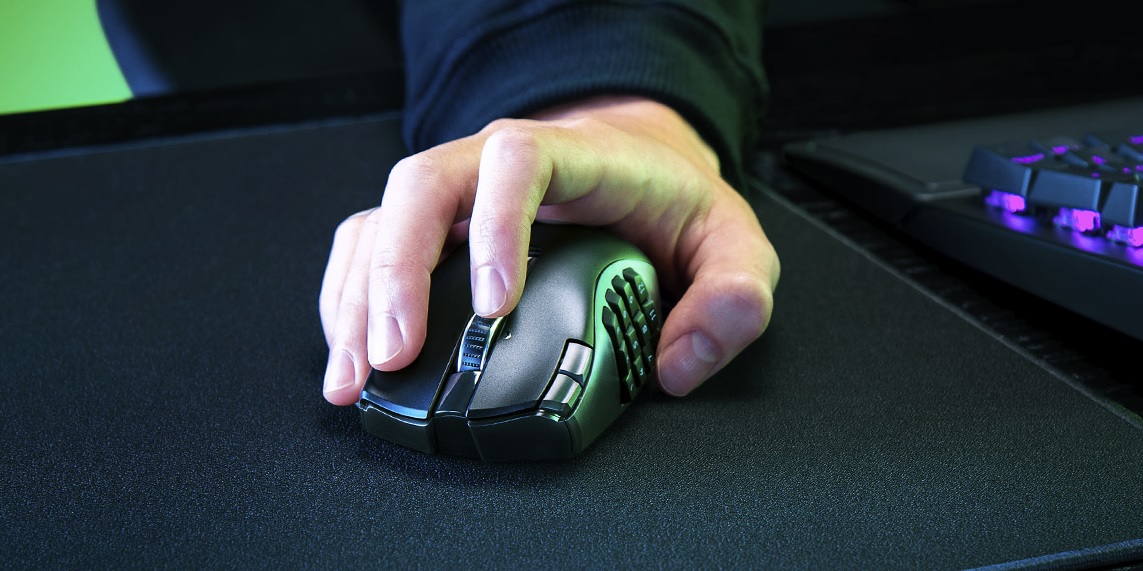
The last couple of things I want to mention are the price and its legacy. The Naga V2 HyperSpeed is often seen as the younger disciple of the Naga V2 Pro, though that's not entirely fair considering its extensive options and versatility. Coming in at around R2,000, it's certainly not a cheap or "budget" version of the mouse either and may only cater to the die-hard MMO enthusiasts or gamers of the market. There's also the weight and size. At 118g with batteries in, it's a large, weighty little fella that could be off-putting for those that like their mice to be more lightweight and less tanky. It was perfect for me.
The Razer Naga V2 HyperSpeed is an impressively versatile, weighty mouse that's pretty much tailored for every genre of video game, especially for MMO enthusiasts. Thanks to its several remappable controls, satisifyingly clicky buttons and smooth gliding, it's a must-have - as long as you don't mind the price tag. Razer have once again cooked up another praise-worthy gaming mouse that's built for near-perfection.


Please login to post comments.
More Reviews

Review: Hellraiser: Revival
I’ve been a fan of the Hellraiser movies ever since I snuck a VHS rental (yeah, remember those?) of ...
13-10-26 Read more

Review: The Sinking City 2
The Sinking City 2, from Ukrainian developer Frogwares, is less of a sequel than it is a Lovecraftian...
12-10-26 Read more

Review: Fire Emblem: Fortune's Weave
It’s legitimately very hard to believe that it’s been seven whole years since Fire Emblem: Three Houses...
05-10-26 Read more
Review: Control Resonant
It’s been seven years since the events of developer Remedy Entertainment’s original 2019 Control title...
02-10-26 Read more

Review: Gears of War: E-Day
Xbox’s flagship Gears of War series has had a bit of an identity crisis over the last decade. After ...
01-10-26 Read more

Review: Gachiakuta
Gachiakuta took the world by storm when it first aired from July to December 2025. With its gritty animation...
28-09-26 Read more

Review: Elden Ring: Tarnished Edition (Switch 2)
What can I say about Elden Ring that hasn’t already been said? From Software’s magnum opus originally...
21-09-26 Read more
Review: The Blood Of Dawnwalker
Rebel Wolves’s The Blood of Dawnwalker has often been compared to The Witcher III: Wild Hunt from fellow...
15-09-26 Read more

Review: Marvel's Wolverine
When I think about some of PlayStation Studios’ most consistent developers, Insomniac Games always ranks...
10-09-26 Read more

Review: Dumb Ways to Build
Originally a public service announcement which discouraged the Australian public from thoughtless activity...
09-09-26 Read more