Latest Updates
Who's Online

Please sign in to add comments


Cart Contents
| Item: | Price: | Qty: |
|---|---|---|
| Total: R 0.00 | ||
User Content
Latest Poll
Review
Review: MSI Modern 16S AI+
Voyager.

Finding the right notebook isn't nearly as simple as it used to be. Walk into any retailer today and you'll be greeted by rows upon rows of machines promising cutting-edge AI features, all-day battery life, lightweight designs and enough performance to handle everything from spreadsheets to photo editing. The problem is that very few notebooks actually manage to balance all of those elements without sacrificing something important along the way. That's precisely where MSI's Modern series has quietly carved out its own place over the years. Rather than trying to compete with the company's gaming giants like the Raider or Crosshair line-up, the Modern series has always been about dependable productivity with just enough premium flair to make everyday work feel enjoyable.

After spending considerable time with the MSI Modern 16S AI+ G3M, I walked away pleasantly surprised. This isn't the kind of notebook that's designed to chase benchmark records or replace your gaming desktop. Instead, MSI has created something that feels purpose-built for students juggling assignments, professionals constantly bouncing between meetings, and anyone who spends more time creating documents than chasing frame rates. More importantly, it does so with a quiet confidence that never feels like it's trying too hard.
First up, here's a quick look at the specs:
Display: 16-inch FHD+ (1920 × 1200) OLED
Refresh Rate: Up to 120Hz (VRR)
Processor: Intel® Core™ Ultra Series 3
Graphics: Intel® Graphics
Memory: Up to 32GB DDR5 RAM
Storage: 1TB PCIe Gen4 NVMe SSD
Operating System: Windows 11 Home
AI Features: Copilot+ PC & MSI AI Engine
Keyboard: Backlit keyboard with Copilot key
Touchpad: MSI Action Touchpad
Webcam: 720p HD IR webcam with privacy shutter
Audio: Dual 2W speakers
Wireless: Wi-Fi 6E & Bluetooth 5.3
Ports: 2× USB-C, 2× USB-A, HDMI 2.1, RJ45, MicroSD, Audio Combo Jack
Battery: 60Wh
Weight: From 1.59kg
Quick Verdict
In case you want the short version of the review, the MSI Modern 16S AI+ is a fantastic productivity notebook tailor-made for students, professionals, and users who frequently work on the move. Highlighted by a stunning OLED display, great portability, a silent keyboard while typing, and dependable battery life for long hours of work, the only drawback to this otherwise phenomenal device is its modest webcam quality which will still function well for online meetings, but may not be of the highest quality on the market. It's also not the most ideal choice for a high-performance gaming notebook (don't worry, MSI has your gaming needs covered with laptops like the ultra-powerful MSI Raider 16 Max HX). Now, onto the full review.

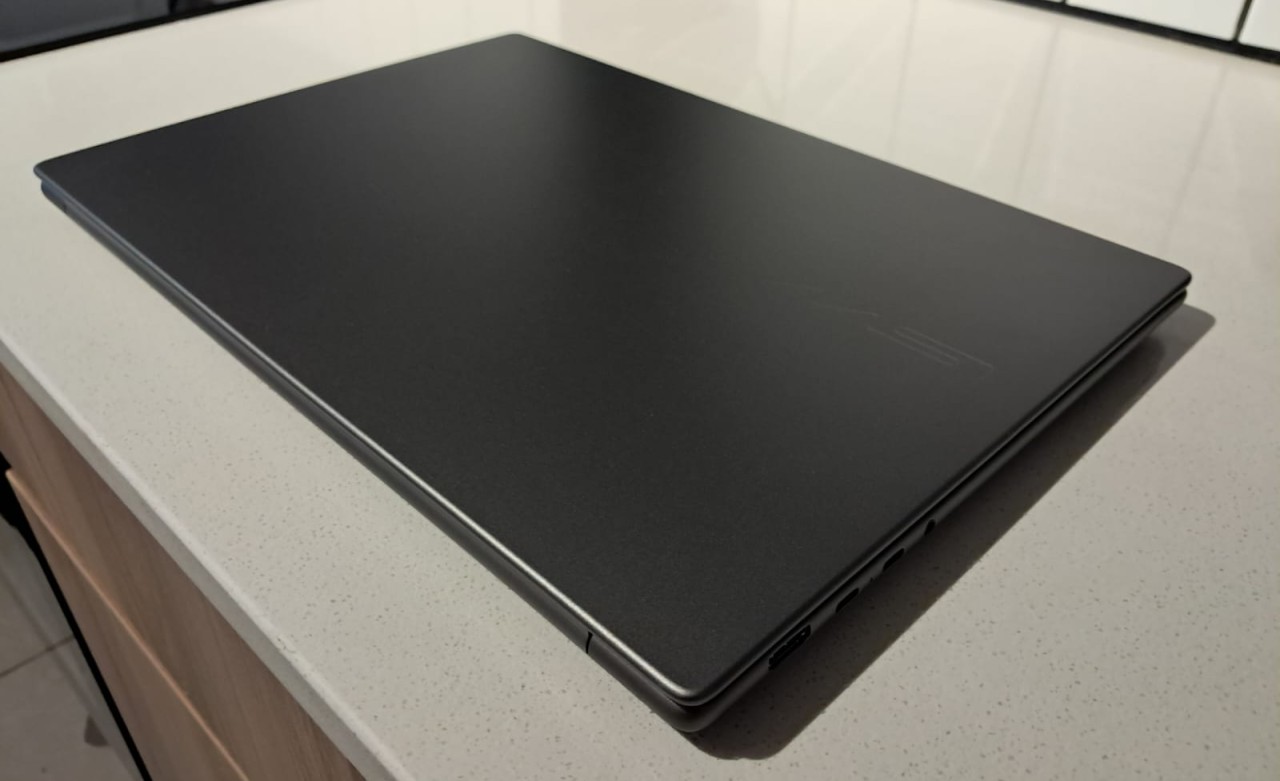
The first thing that immediately caught my attention was the notebook's design. MSI has taken a refreshingly understated approach here. The Modern 16S AI+ G3M isn't flashy, nor does it need to be. Its slim chassis, clean lines and elegant finish give it a premium appearance without drawing unnecessary attention to itself. Personally, I appreciate notebooks that look professional rather than overly aggressive, and MSI has struck that balance beautifully.
Its slim chassis, clean lines and elegant finish give it a premium appearance without drawing unnecessary attention to itself.
That elegant design also extends to its portability. Despite housing a generous 16-inch display, the notebook remains impressively slim and lightweight. Throughout my time using it, carrying it between rooms, taking it into meetings and slipping it into a backpack never once felt cumbersome. Students rushing between lectures or professionals frequently travelling for work will likely appreciate just how effortless it is to move around with. Sometimes the best compliment you can give a productivity notebook is that you almost forget it's there until you need it, and that's exactly how the Modern 16S AI+ G3M feels.

Of course, portability only matters if the notebook is enjoyable to use once you've opened the lid, and thankfully that's where the OLED display steals the show. The screen is absolutely gorgeous. The colours burst to life with remarkable vibrancy, blacks appear wonderfully deep thanks to OLED technology, and contrast is outstanding whether you're editing presentations, watching Netflix after work or simply browsing the web. I found myself constantly appreciating how crisp everything looked, from lengthy Word documents to high-resolution photography. Spending hours staring at a display every day can become surprisingly fatiguing on lower-quality panels, but MSI has ensured that's rarely the case here.
The larger 16-inch display also deserves praise. Having that additional screen space makes multitasking significantly easier, particularly when working with multiple windows side by side. As someone who frequently jumps between writing documents, researching online and managing image files, the extra workspace proved genuinely useful rather than simply making the notebook physically larger.

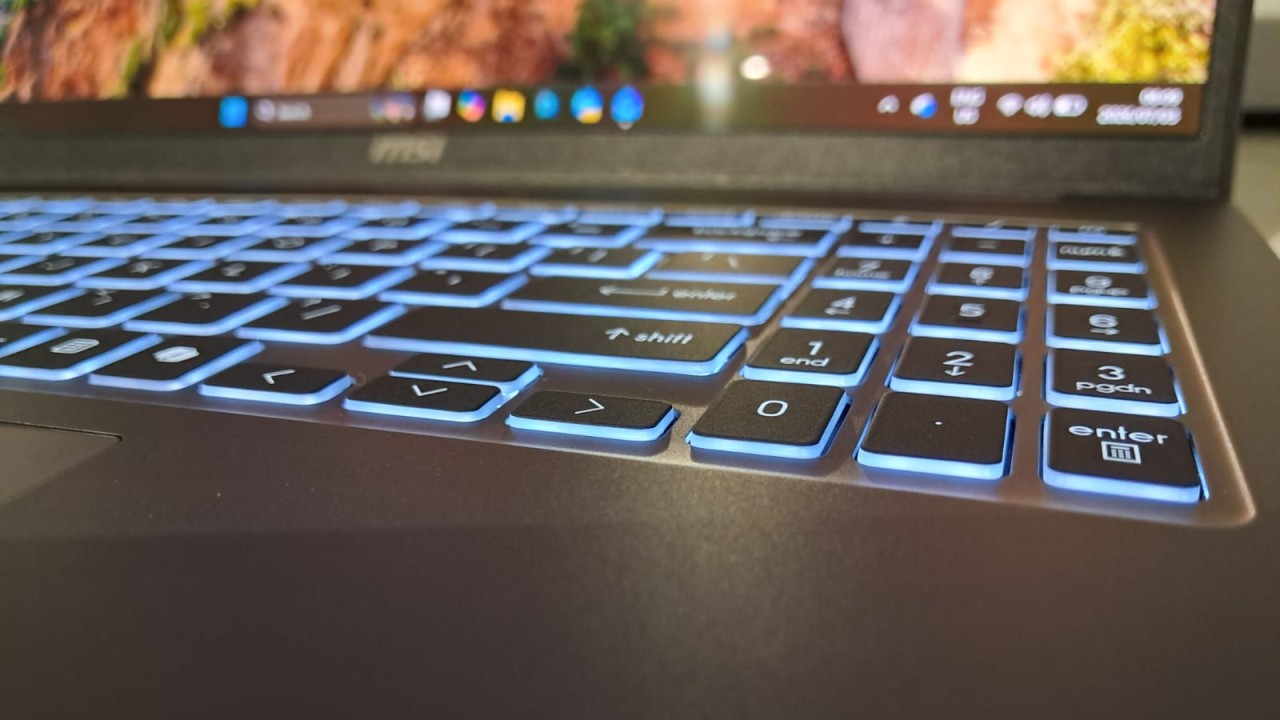
Typing has also become one of my favourite aspects of using the Modern 16S AI+ G3M. Admittedly, keyboard preferences are highly subjective, but MSI has done an excellent job creating one that's exceptionally quiet while remaining satisfying to type on. There's very little distracting clatter during long writing sessions, making it equally comfortable in an office, university library or coffee shop. I often found myself typing late into the evening without ever becoming conscious of the keyboard itself, and that's usually a sign that the experience has been thoughtfully designed.
There's very little distracting clatter during long writing sessions, making it equally comfortable in an office, university library or coffee shop.
The touchpad is equally deserving of attention, particularly thanks to MSI's Action Touchpad functionality. At first, I wasn't entirely convinced that I would use the additional shortcuts very often. It seemed like one of those features that sounded impressive on paper but might become an afterthought in daily use. Thankfully, that wasn't the case.

The integrated controls quickly became second nature. Adjusting brightness, changing volume, controlling media playback and accessing useful shortcuts all felt intuitive without interrupting my workflow. The Action Touchpad focuses on reducing unnecessary steps between you and the task you're trying to accomplish. It's a subtle QoL improvement that becomes increasingly difficult to give up once you've grown accustomed to it.
Powering the experience is MSI's latest AI-focused hardware platform, and while "AI" has admittedly become one of technology's favourite buzzwords lately, I was pleasantly surprised by how practical many of the features actually feel. Rather than completely changing the way you work, the AI capabilities quietly improve everyday tasks behind the scenes. Video conferencing enhancements, intelligent power management and workflow optimisation all contribute to making the notebook feel more responsive without constantly reminding you that artificial intelligence is involved. That's probably the best implementation of AI I could ask for since it enhances the experience without becoming the experience.

Battery life is another area where the Modern 16S AI+ G3M consistently impressed me. MSI advertises long-lasting endurance, and for once that claim largely holds up under realistic usage. Throughout several workdays consisting of writing, web browsing, video streaming, email management and general multitasking, the notebook comfortably lasted long enough that I rarely found myself anxiously searching for a charger. Naturally, more demanding workloads will drain the battery quicker, but for its intended audience of students and professionals, the longevity here is genuinely excellent.
This becomes especially important if you're someone who spends a lot of time travelling. Whether you're working during a long flight, studying between university lectures, catching up on emails while waiting at an airport or simply moving between different offices throughout the day, having dependable battery life changes the entire ownership experience. Instead of treating every available power outlet like hidden treasure, you can simply focus on getting your work done. Combined with its lightweight design, quiet keyboard and slim chassis, the Modern 16S AI+ G3M becomes an incredibly easy notebook to recommend for anyone constantly on the move.
Instead of treating every available power outlet like hidden treasure, you can simply focus on getting your work done.
Naturally, no notebook is perfect, and MSI has made a couple of compromises that prospective buyers should be aware of. The biggest disappointment for me was undoubtedly the webcam. While perfectly serviceable for the occasional Teams or Zoom meeting, image quality simply doesn't match the otherwise premium experience offered by the rest of the notebook. In an era where remote work and online lectures have become part of everyday life, I expected something noticeably sharper. It's certainly usable, but it lacks the clarity I'd want if video conferencing was a major part of my daily routine.
Thankfully, those shortcomings never overshadowed what MSI has achieved here. The Modern 16S AI+ G3M understands exactly what kind of notebook it wants to be and rarely loses sight of that goal. It isn't pretending to be a gaming powerhouse, nor is it trying to reinvent portable computing through flashy marketing gimmicks. Instead, it focuses on delivering an elegant, dependable productivity experience backed by an exceptional OLED display, genuinely impressive battery life, thoughtful AI enhancements and one of the most enjoyable typing experiences I've had on a productivity notebook in quite some time.
The MSI Modern 16S AI+ G3M may not shout for your attention, but after spending considerable time with it, I don't think it needs to. It lets its gorgeous OLED display, excellent portability, silent keyboard and dependable battery life do all the talking. Sometimes, that's exactly what a great productivity notebook should do.
MSI Modern 16S AI+ FAQ
Can the MSI Modern 16S AI+ be upgraded?
Yes. The notebook's SSD and RAM can be upgraded for additional storage space or for those who don't want the hassle of using an external storage device.
Does the MSI Modern 16S AI+ support USB-C charging and external displays?
Yes, the MSI Modern 16S AI+ fully supports both USB-C charging and external displays. It features two USB-C ports that support Power Delivery 3.0, while the same ports also offer DisplayPort for an external monitor. Additionally, it includes a full-size HDMI 2.1 port (for support of up to 4K at 60Hz).


Please login to post comments.
More Reviews

Review: The Odyssey
Homer’s Odyssey is a story that has been told time and time again, going through several different iterations...
21-07-26 Read more

Review: MSI Modern 16S AI+
Finding the right notebook isn't nearly as simple as it used to be. Walk into any retailer today and...
20-07-26 Read more

Review: Evil Dead Burn
The Evil Dead series is one horror franchise that always stayed in its own pocket, never bowing to industry...
13-07-26 Read more

Review: Ascend to Zero
As far as storytelling goes, there are very few things more stressful for your average protagonist than...
10-07-26 Read more

Review: Star Fox
For the nearly half-dozen times that Nintendo has attempted to remake or remaster Star Fox, it has always...
09-07-26 Read more

Review: Assassin's Creed: Black Flag Resynced
Any time that someone has asked me what my favourite game is, without hesitation, I have always confidently...
08-07-26 Read more

Review: MSI Raider 16 Max HX
Gaming laptops have always been built around compromise. If you wanted desktop-level performance, you...
02-07-26 Read more

Review: Widow's Bay
Apple TV’s output of quality shows has continued to impress me. Between Severance, Silo and Pluribus...
30-06-26 Read more

Review: Witch Hat Atelier
Witch Hat Atelier was one of the most anticipated spring anime releases, partly because of the story...
29-06-26 Read more

Review: Supergirl
I didn’t know what to expect going into the new Supergirl (2026) movie, since I’m not a big fan of the...
25-06-26 Read more