Latest Updates
Lurch just commented on NVIDIA’s DLSS 5 Tech Launching This Week – NBA 2K27 a Showcase Title
The Last of Us Remastered now available pre-owned.
Clair Obscur: Expedition 33 now available pre-owned.
KnightFall500 has just posted to Upcoming Movies
Who's Online
Guests: 159, Members: 10

Please sign in to add comments
04 September at 15:20
04 September at 13:53
04 September at 13:51
04 September at 11:14
04 September at 11:13

04 September at 10:14
04 September at 10:07
04 September at 9:57
04 September at 9:09
04 September at 9:07
Cart Contents
| Item: | Price: | Qty: |
|---|---|---|
| Total: R 0.00 | ||
User Content
Latest Poll

Gigabyte B560M Aorus Pro Micro-ATX
R 271.00 / month on credit ( what is this? )


Description
Gigabyte B560M Aorus Pro Micro-ATX
AORUS PRO comes with upgraded power solution, incredible cooling design, all PCIe 4.0 design and outstanding connectivity to elevate your gaming experience to the next level.
• Dual Channel Non-ECC Unbuffered DDR4, 4 DIMMs
• Direct 12+1 Phases Digital VRM Solution with 50A DrMOS
• Shielded Memory Routing for Better Memory Overclocking
• Fully Covered Thermal Design with High Coverage MOSFET Heatsinks
• Blazing Fast Intel® 2.5GbE LAN with cFosSpeed
• Dual Ultra-Fast NVMe PCIe 4.0*/3.0 x4 M.2 with Thermal Guard
• SuperSpeed USB 3.2 Gen2x2 TYPE-C® delivers up to 20Gb/s Transfer Speeds
• Pre-installed IO Shield for Easy and Quick Installation
• RGB FUSION 2.0 with Multi-Zone Addressable LED Light Show Design, Support Addressable LED & RGB LED Strips
• Smart Fan 6 Features Multiple Temperature Sensors , Hybrid Fan Headers with FAN STOP
• Q-Flash Plus Update BIOS without Installing the CPU, Memory and Graphics Card
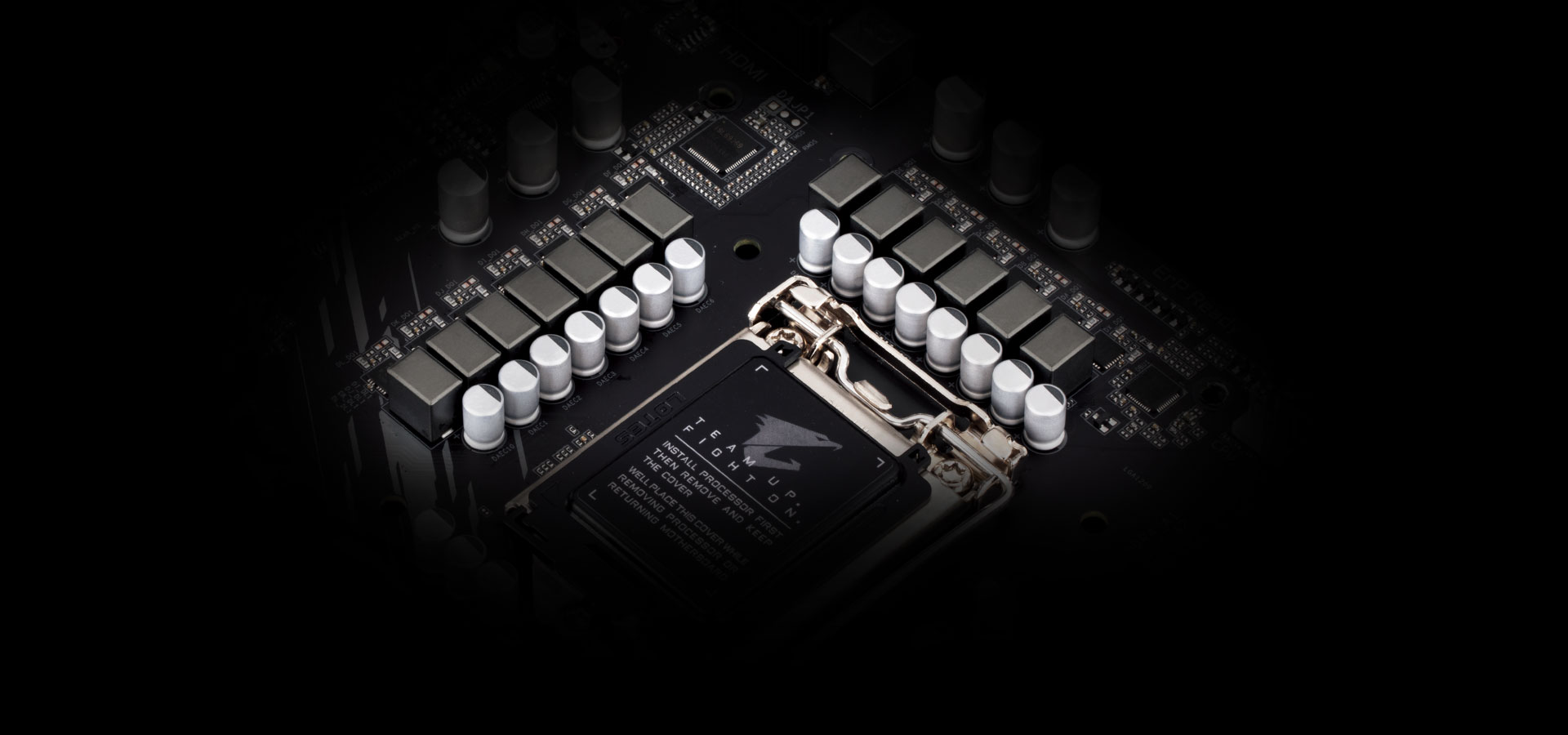
DIRECT POWER DESIGN
B560M AORUS motherboard uses an 12+1 phases digital CPU power design which includes both digital PWM Controller and DrMOS. These 100% digital controller and additional 8 Solid-pin CPU Power Connectors offer incredible precision in delivering power to the motherboard's most power-hungry and energy-sensitive components, allowing enthusiasts to get the absolute maximum performance from the new Intel 11th Gen CPU.
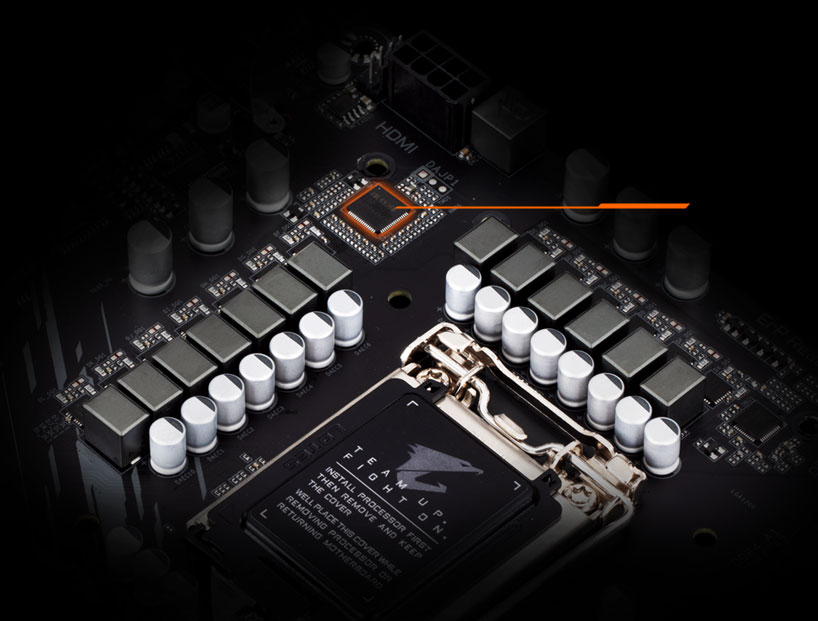
More efficient and cleaner power delivers to the CPU ensures stable performance under heavy loading.
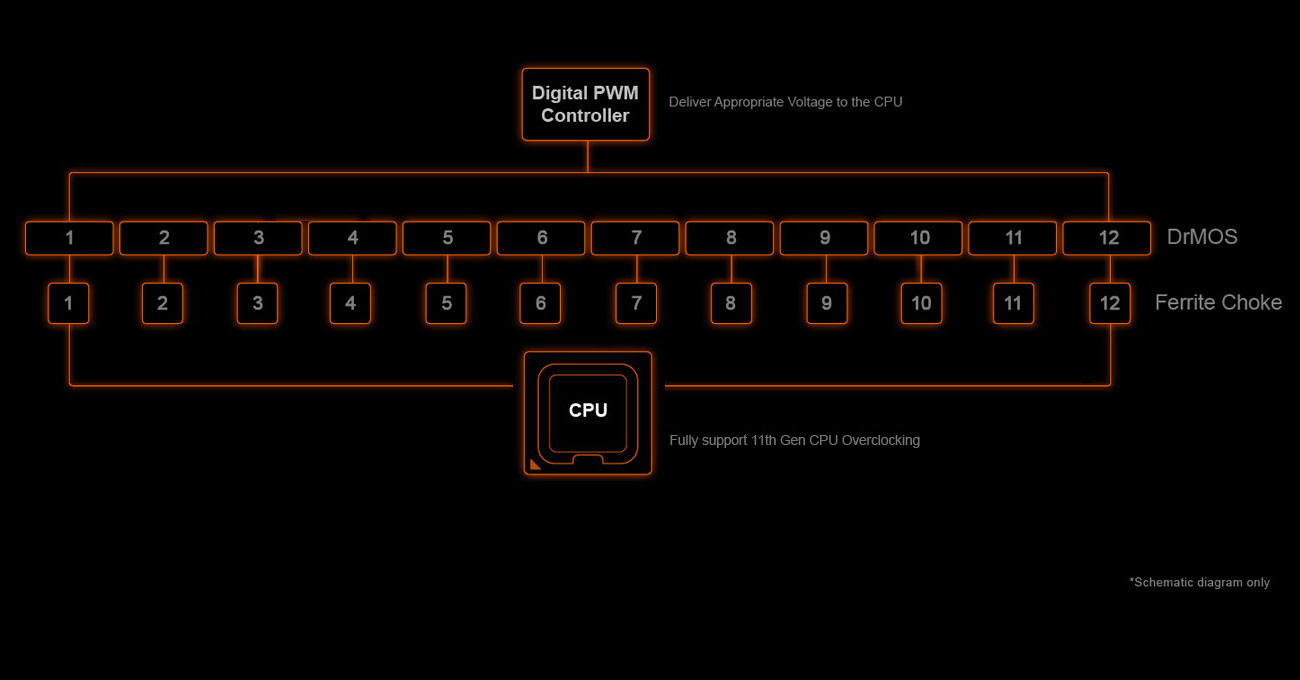
• Digital PWM Controller to deliver appropriate voltage to the CPU.
• Direct 12+1 Phases DrMOS without PWM Doublers, each power phase connects directly to the CPU, With capability to handle 600 Amps current in total.
• All-solid capacitors to improve Transient response and minimize oscillation.
• 8 Solid Pin CPU Power Connectors.
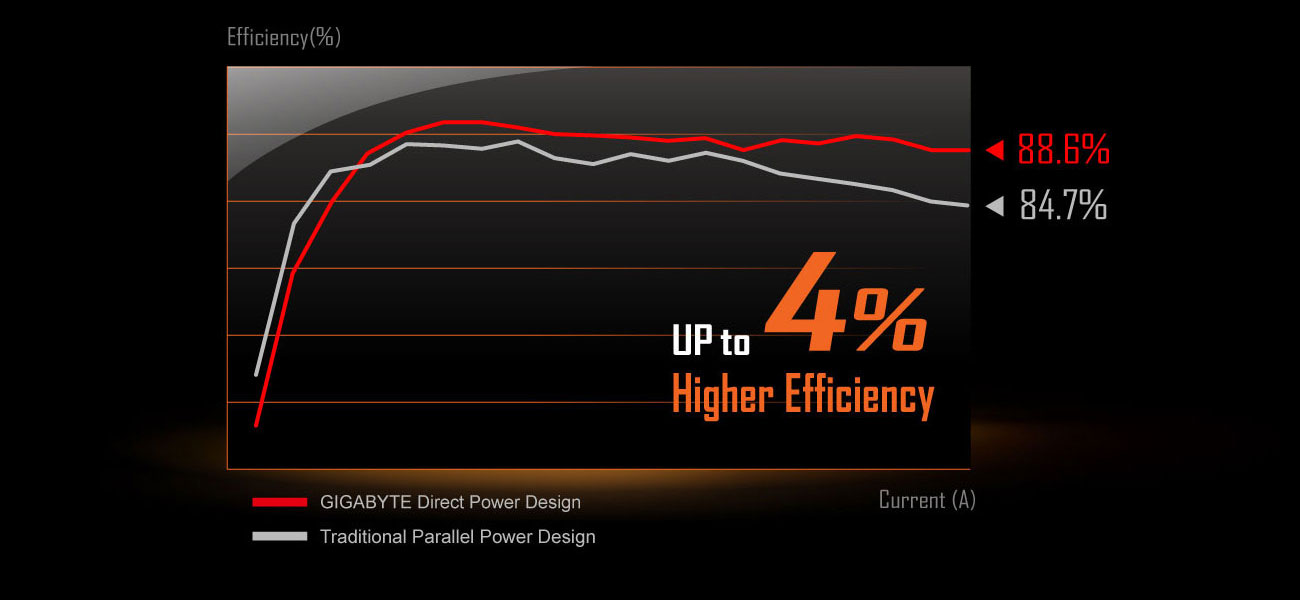
Power Design Efficiency
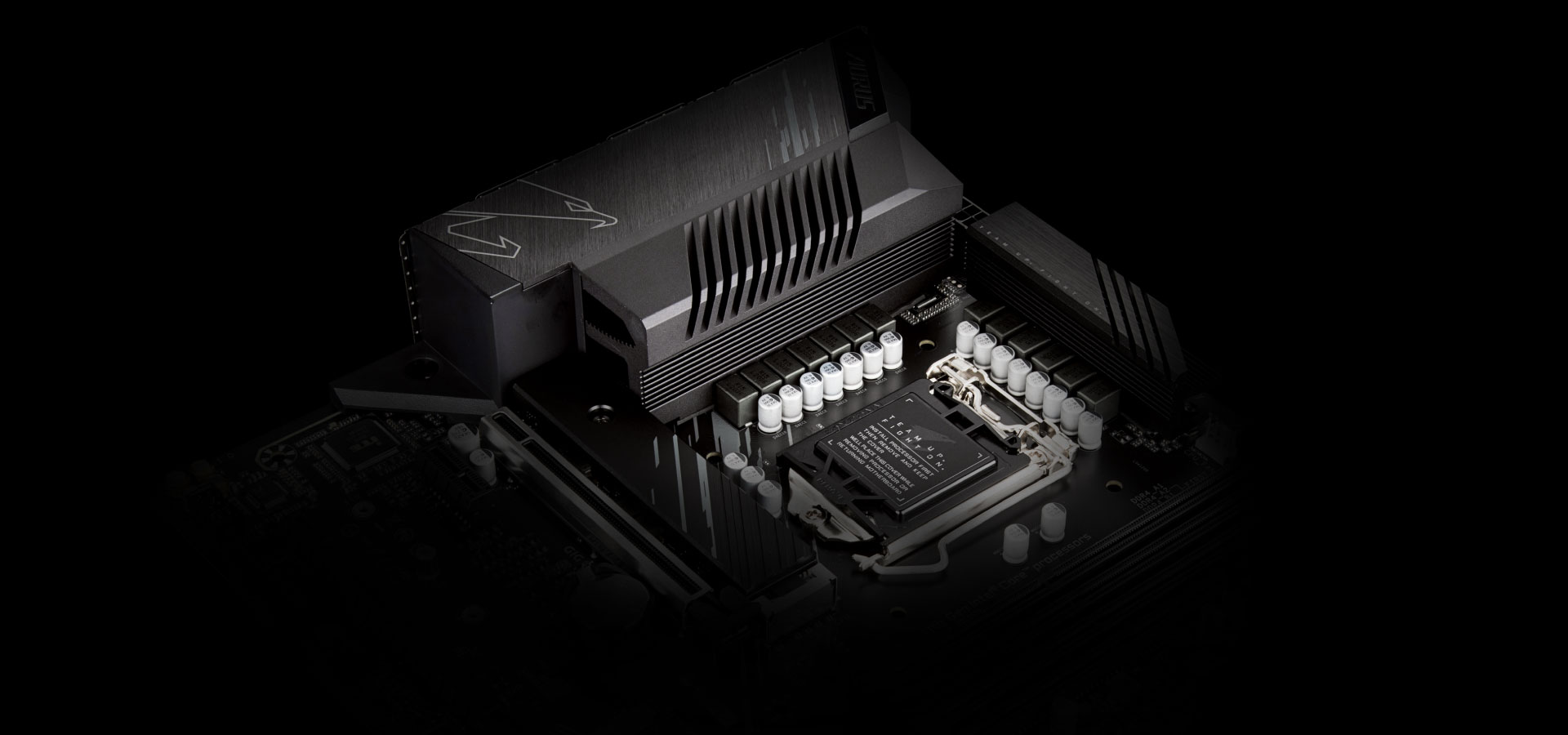
ADVANCED THERMAL SOLUTION
B560M AORUS uses high performance Fully Covered thermal design with high coverage MOSFET Heatsinks and thick thermal pad, providing ultimate MOSFET cooling performance for enthusiasts, overclockers and gamers.
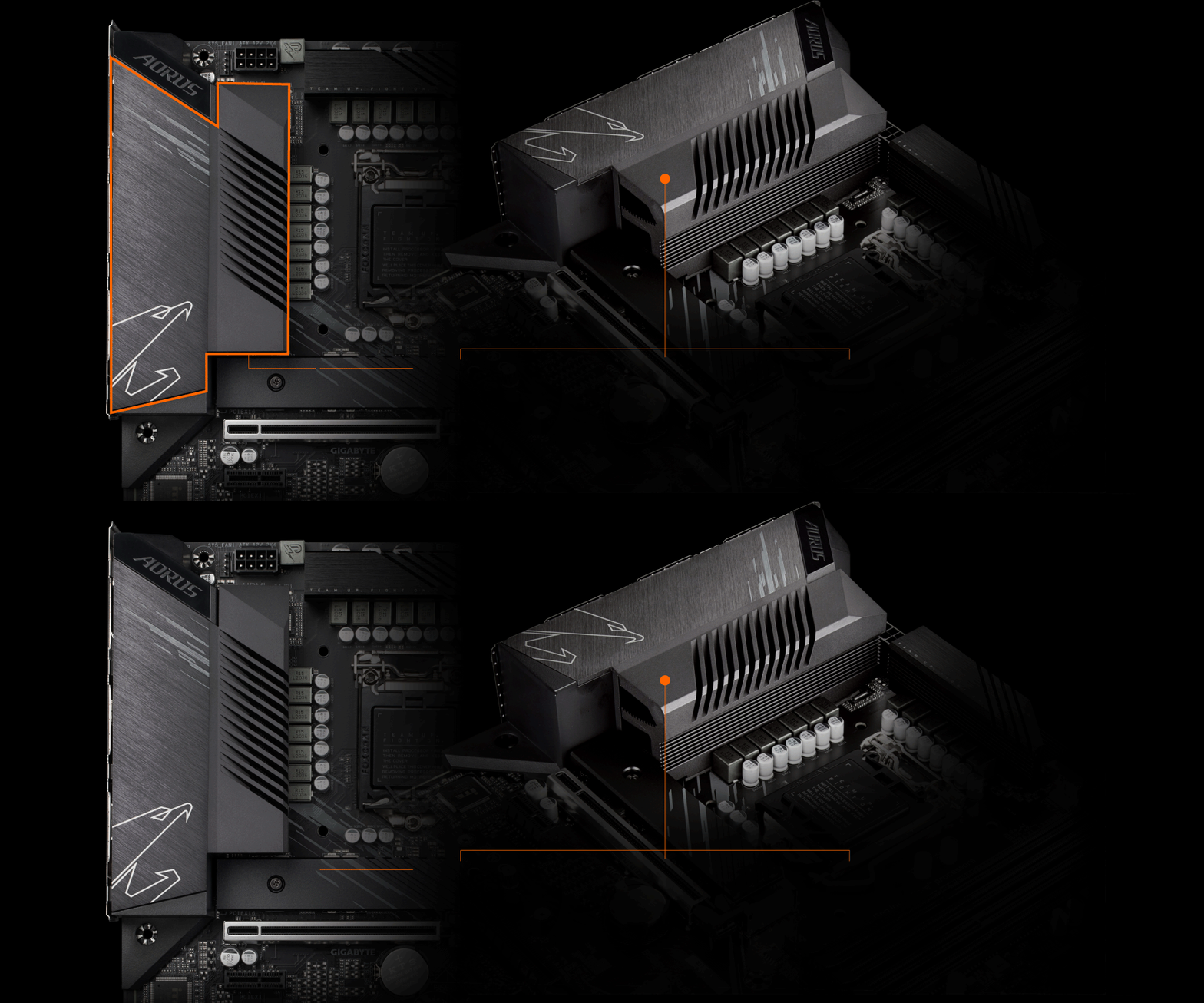
2X larger Surface
Increased surface area up to 2X larger compared to traditional heatsinks. It improves heat dissipation from the MOSFETs.
Real One-piece Build
TMOS is a TRUE single piece heatsink. Its one-piece design and larger surface drastically improve the cooling performance against competitors’ multi-piece design
Multi-cut Design
TMOS features several channels and inlets on the heatsink. This design allows for the air flow to go through which leads to a great improvement of the heat transfer performance.
AORUS M.2 Thermal Guard
GIGABYTE Ultra-Efficient M.2 Thermal Guard
With durability in mind, GIGABYTE provides a thermal solution for M.2 SSD devices. The M.2 Thermal Guard prevents throttling and bottlenecks from high speed M.2 SSDs as it helps to dissipate heat before it becomes an issue.
Smart Fan 6
Smart Fan 6 contains several unique cooling features that ensure gaming PC maintain its performance while staying cool and quiet. Multiple fan headers can support PWM/DC fan and pump, and users can easily define each fan curve based on different temperature sensors across the board via intuitive user interface.
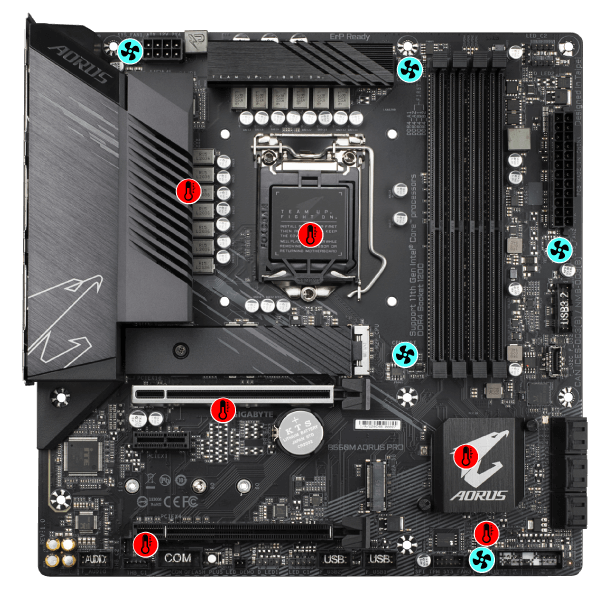
 5 PWM/DC Fan HeadersThis sentence
  6 Internal Temperature Sensors
High Current Support
Each fan headers support PWM and DC fan and Water cooling Pump , and up to 24W (12V x 2A) with Over-Current Protection
Precision Control
Up to 7 temperature/fan speed control points for precise fan curve
Dual Curve Mode
Slope/Stair dual mode for different user scenario
Fan Stop
Fan can stop completely below users' specified temperature point
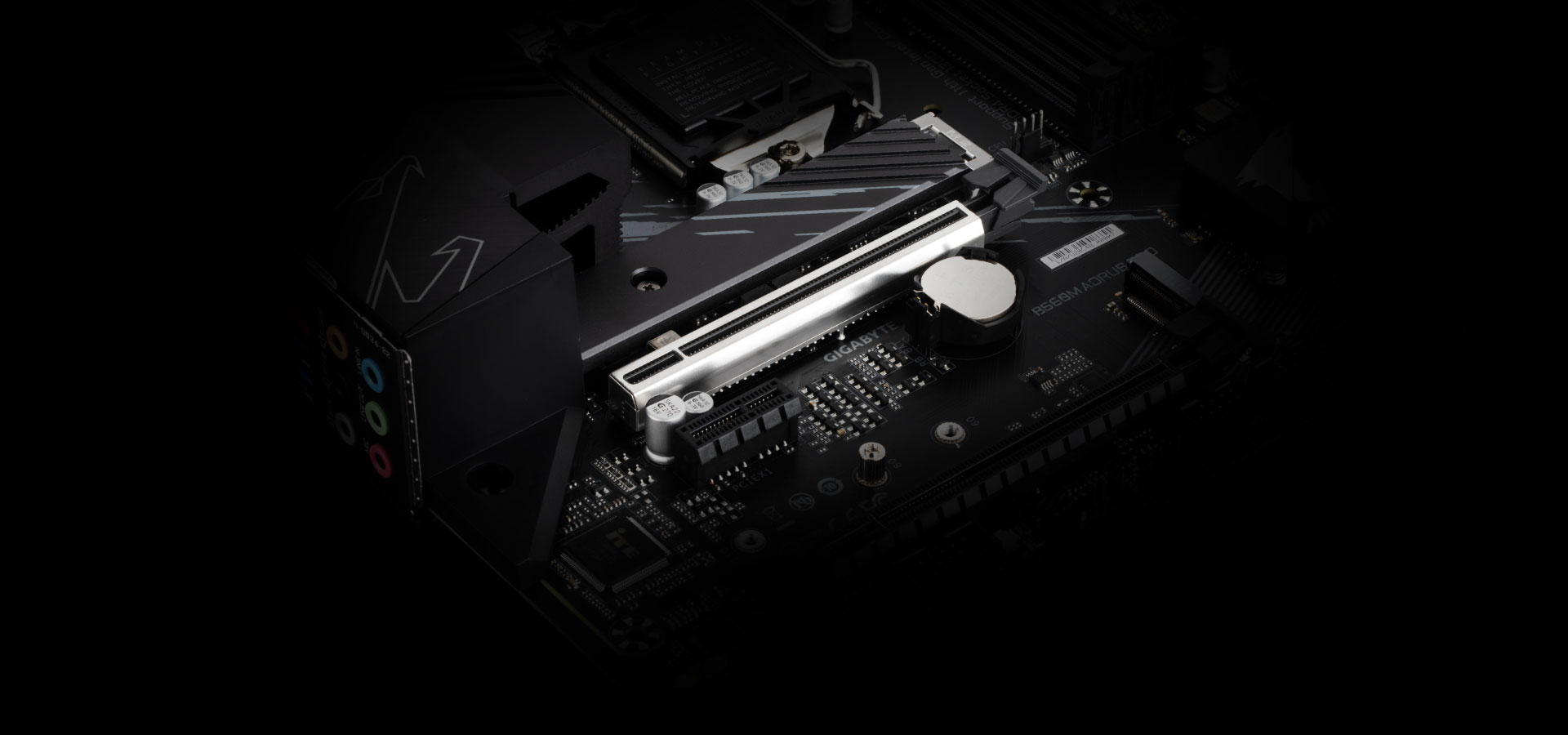
PERFORMANCE
With the best quality components and GIGABYTE R&D design capability, the B560M AORUS is a true beast among motherboards.
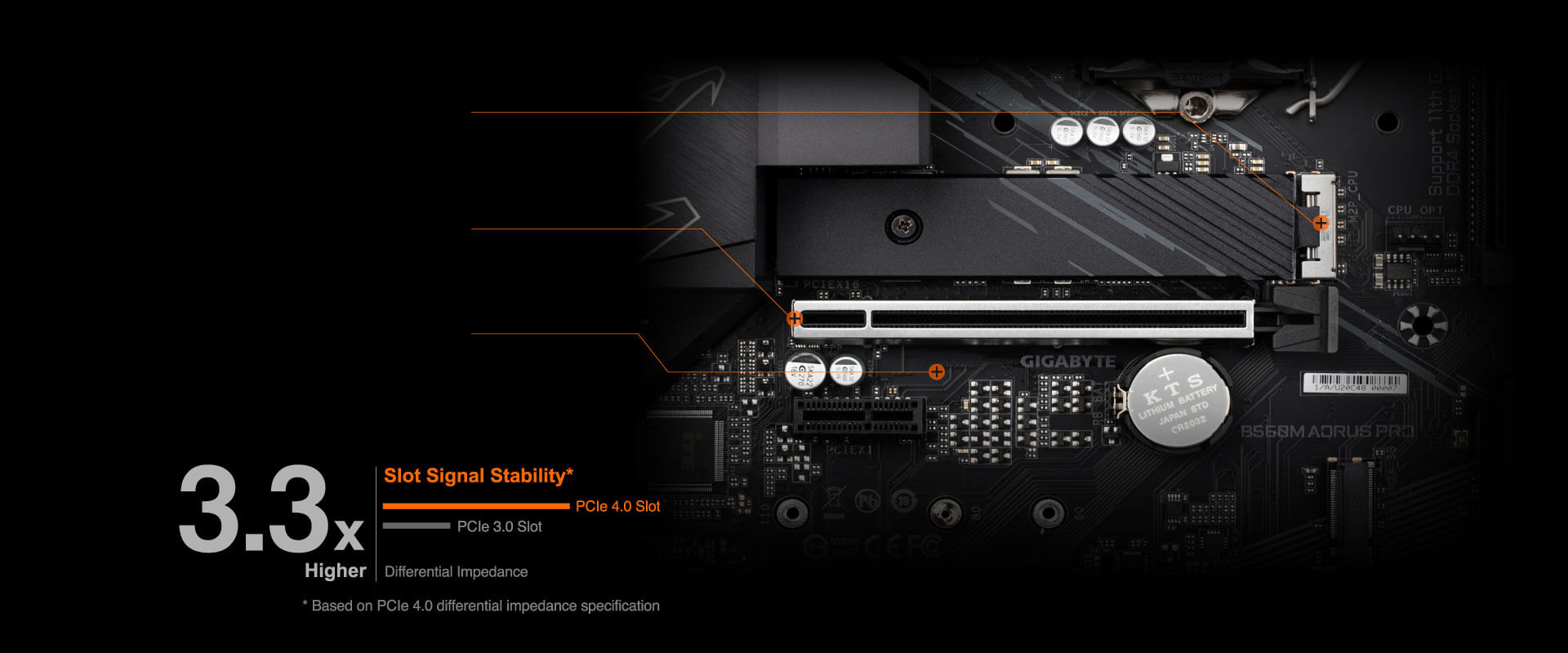
PCIe 4.0 M.2 Slot
M.2 PCIe 4.0 x4 slot with lower impedance.
1 x PCIe 4.0 Slot
Reinforced PCIe 4.0 x 16.
PCIe 4.0 Ready PCB
Low signal Loss PCB.
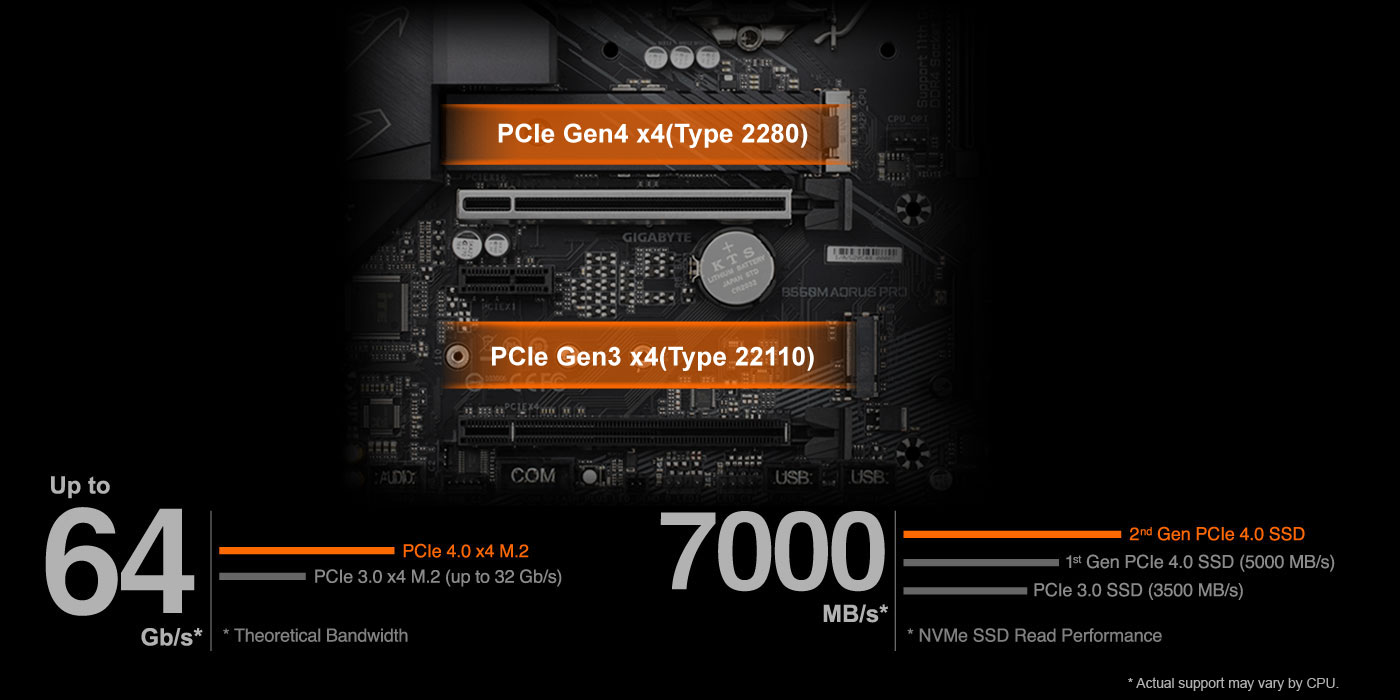
Dual PCIe 4.0/3.0 x4 M.2
GIGABYTE AORUS Motherboards are focused on delivering M.2 technology to enthusiasts who want to maximize their system's potential.
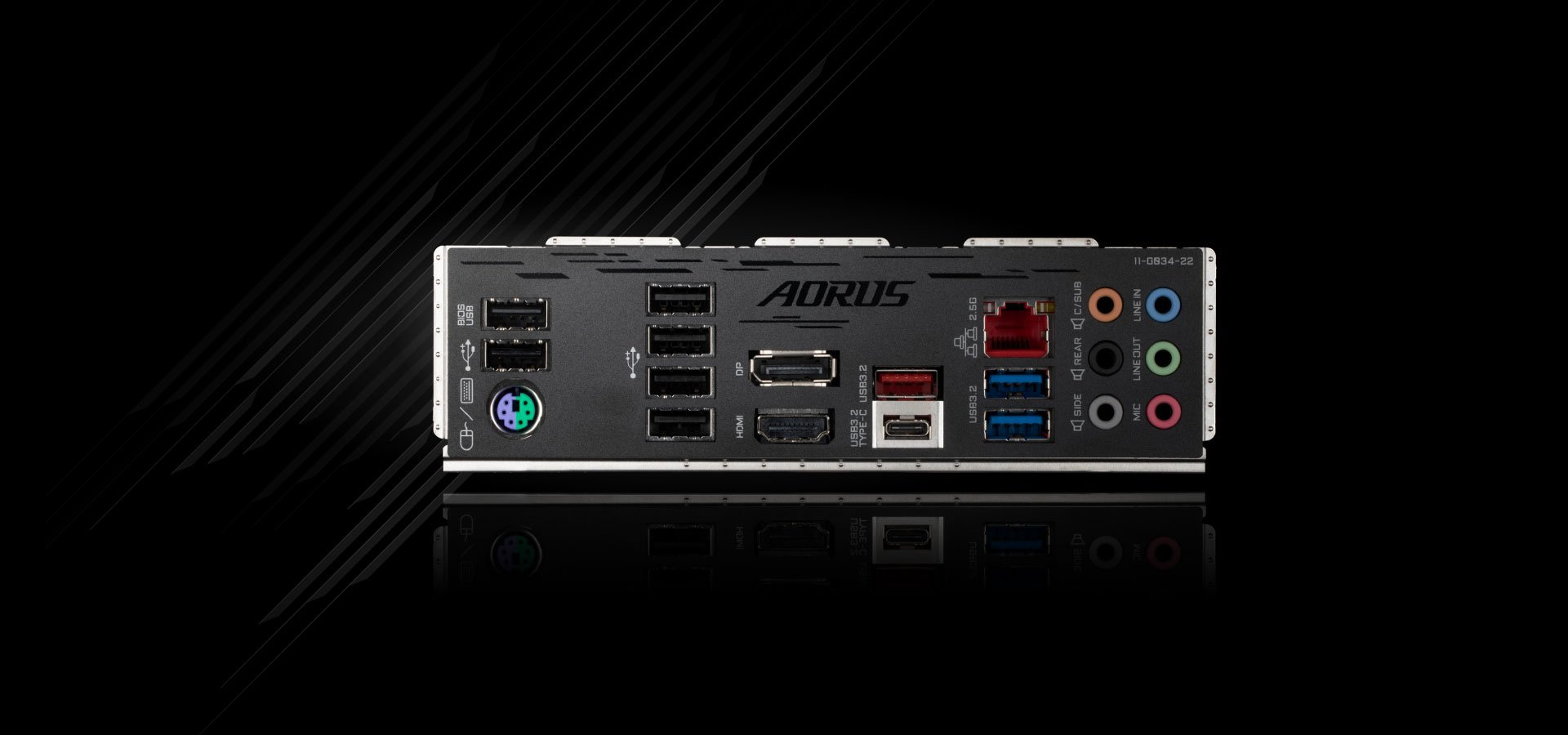
NEXT GENERATION CONNECTIVITY
Intel 2.5GbE LAN Onboard
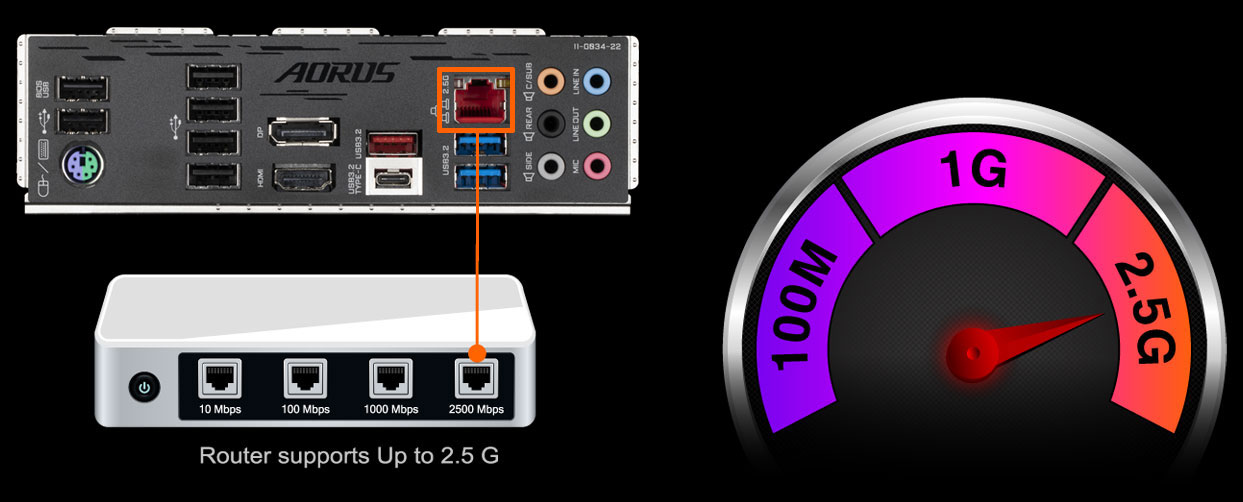
2X Faster than ever
Adoption of 2.5G LAN provide up to 2.5 GbE network connectivity, with at least 2 times faster transfer speeds compared to general 1GbE networking, perfectly designed for gamers with ultimate online gaming experience.
Support Multi-Gig(10/100/1000/2500Mbps) RJ-45 ethernet
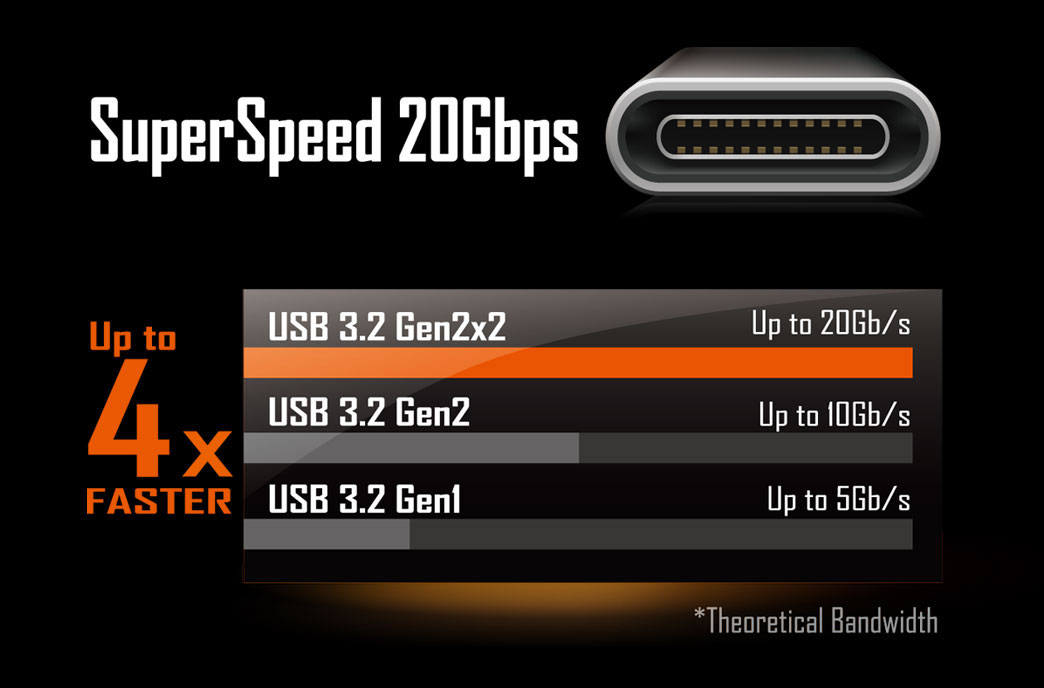
USB Type-C® Front Panel Connector
Equipped with next generation connectivity AORUS Motherboards already support the chassis of the future. The onboard USB Type-C® header for USB 3.2 Gen1 makes access convenient when connecting a USB 3.2 Gen1 drive or charging your new mobile device.
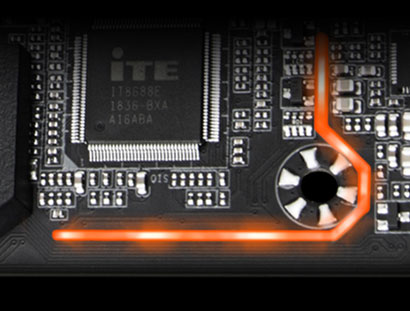
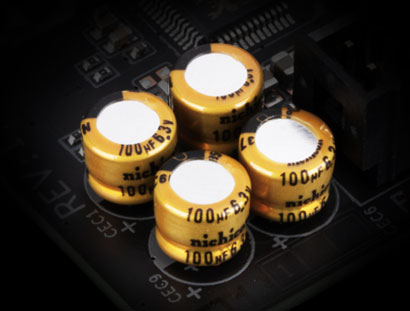
High Quality Onboard Audio Design
Delivers high quality sound resolution and sound expansion to create the most realistic sound effects for professional gamers.
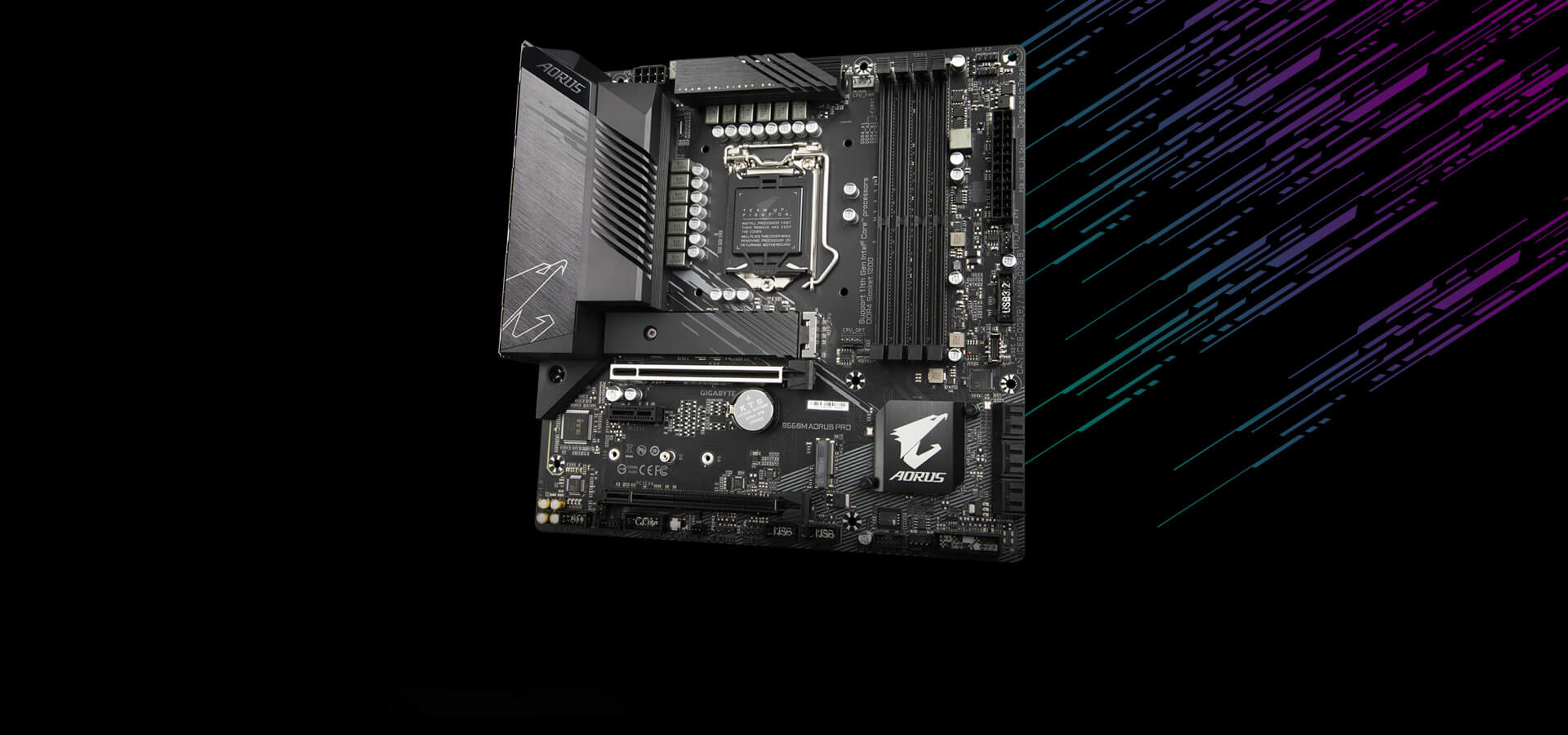
DEFINITIVE AESTHETICS
B560M AORUS PRO features RGB FUSION 2.0 and offers users the option to control onboard, external light strips, and/or AORUS devices with RGB/ Addressable RGB LEDs to make their PC more unique and stylish.

Multi-Zone Light Show Design
Now offering more LED customizations than ever, users can truly adapt their PC to represent their lifestyle. With full RGB support and a redesigned RGB Fusion 2.0 application, the user has complete control over the LEDs which surround the motherboard.
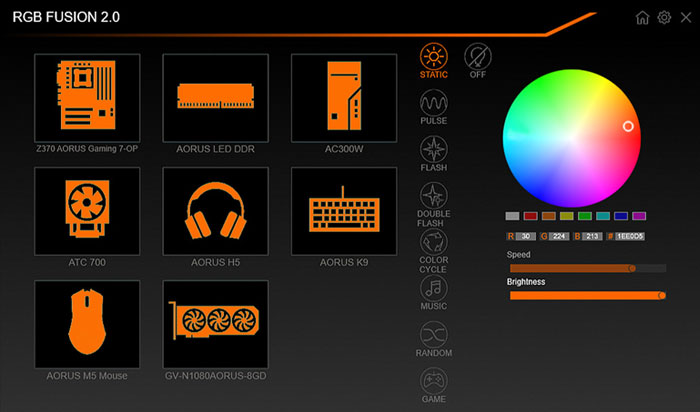
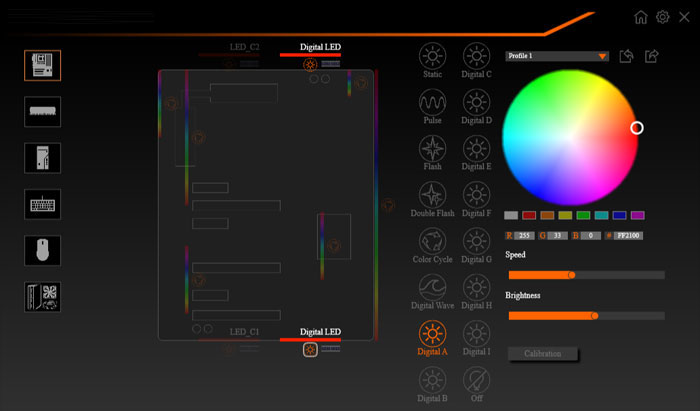
With an integrated intuitive user interface, the RGB Fusion 2.0 provides you a better solution for customizing the lighting effects across all supported devices. From motherboards, graphics cards to the peripheral products, you can personalize your gaming rig with your own style and show off your build by sharing the profiles. In addition, the new gaming mode makes the lighting effects interactive with selected games to bring you the most immersive gaming experience.
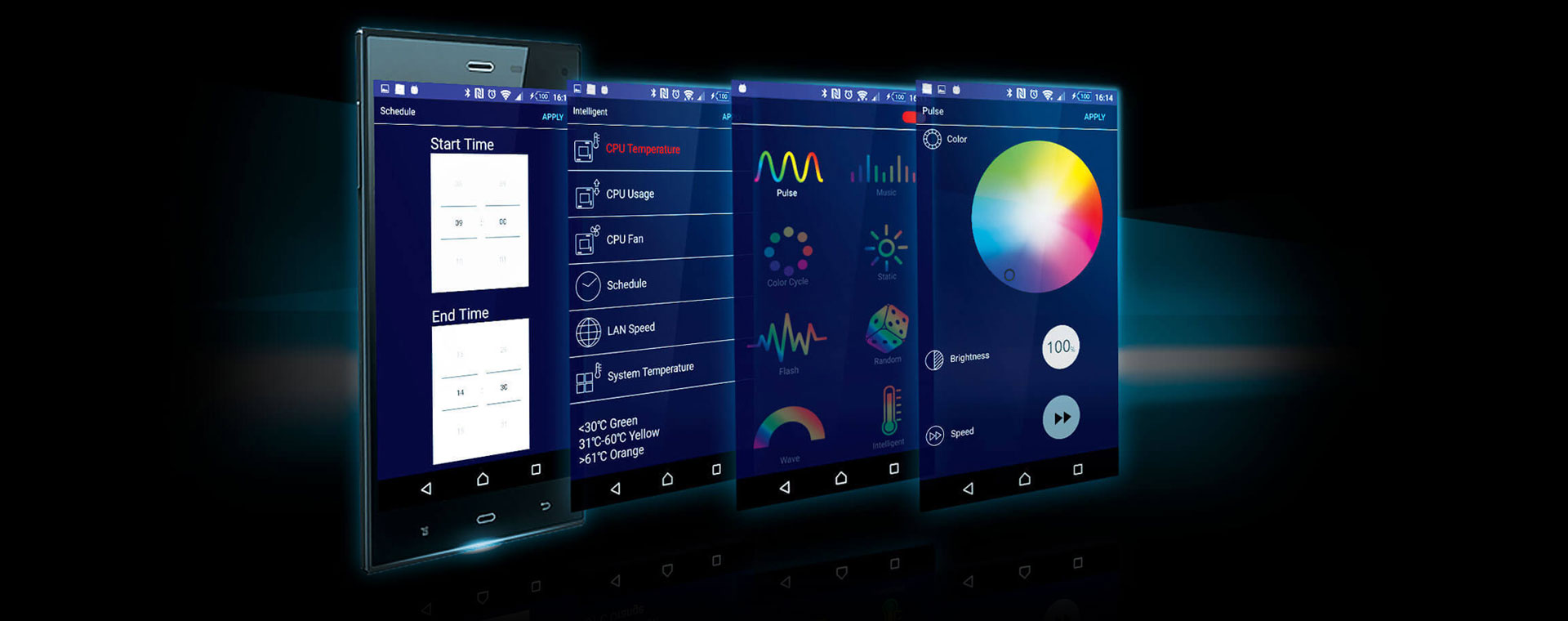
GIGABYTE RGB Fusion APP
Don't just make your PC shine, make it a work of art that friends will envy. With the GIGABYTE RGB Fusion mobile app users can watch as they control the lighting within their gaming PC. This gives users ease of access as they try and adjust colors and speeds for different modes, all this can be achieved away from the keyboard and monitor of their PC.
ULTRA DURABLE
GIGABYTE is reputable for its product durability and high quality manufacturing process. Needless to say, we use the best components we can find for the B560M AORUS motherboard and reinforce every slot to make each of them solid and durable.

Q-Flash Plus
Update the BIOS easily without installing the CPU, memory and graphics card.
With GIGABYTE Q-Flash Plus, you don’t need to install the CPU, memory and graphics card nor enter the BIOS menu to flash the BIOS. Just download and save a new BIOS file (rename to gigabyte.bin) on the USB flash drive, then press the dedicated Q-Flash Plus button and you’re good to go!
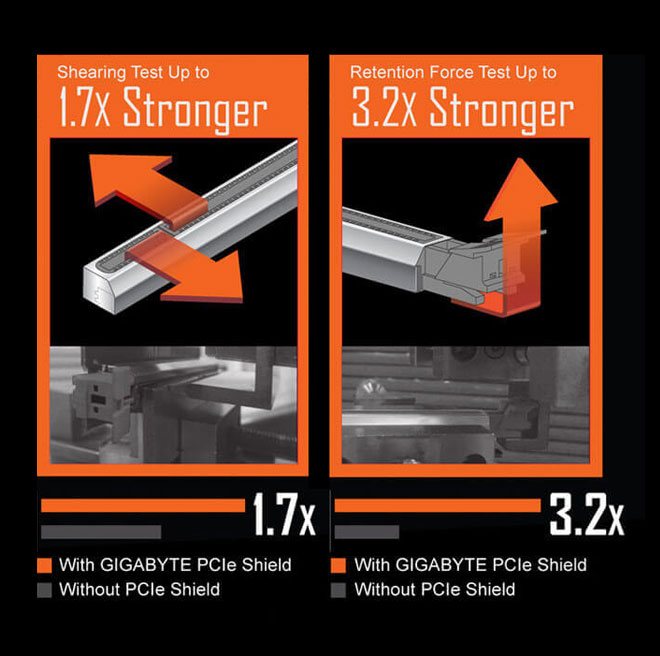
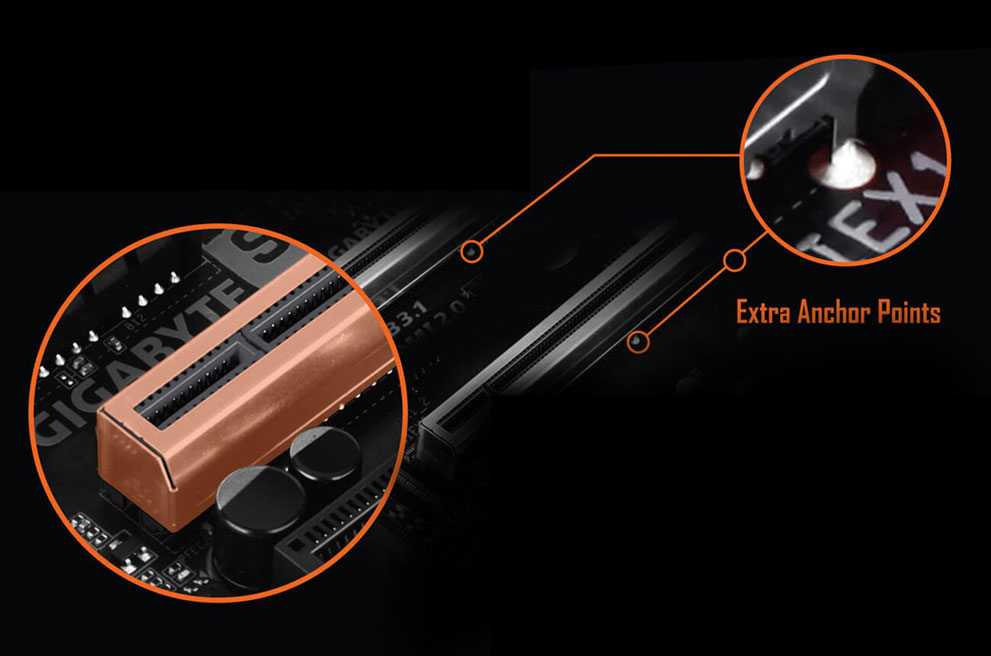
Ultra Durable™ PCIe Armor
Industry Leading Ultra Durable™ PCIe Armor
The innovative one piece stainless steel shielding design from GIGABYTE reinforces the PCIe connectors to provide the extra strength required to support heavy graphics cards.
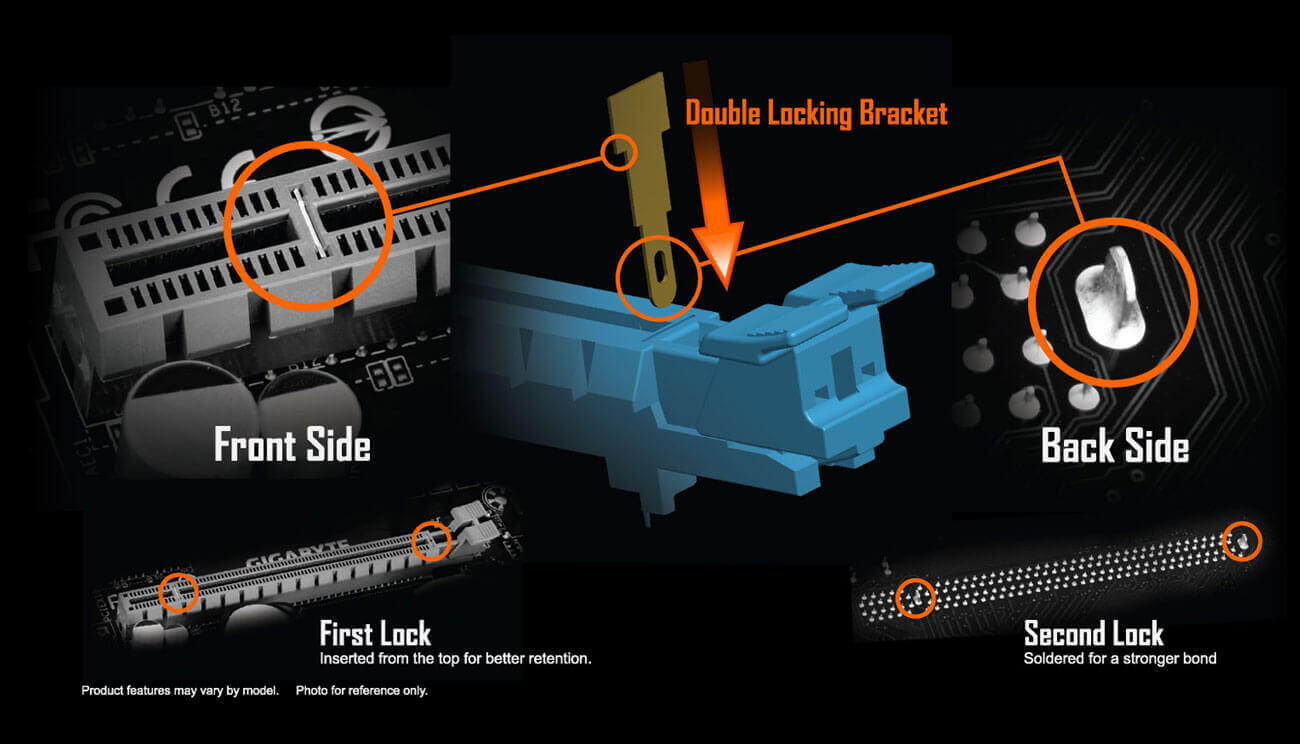
GIGABYTE Patented Double Locking Bracket
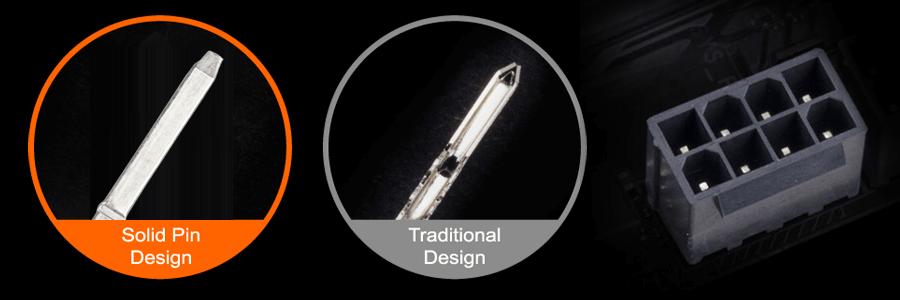
Solid Pin Power Connectors
AORUS motherboards feature solid plated ATX 12V 8pin power connectors to offer a stable power supply during CPU overloading.
Solid Pin Power connector advantages
Larger contact area for electricity
More metal quantity to sustain higher power and generated heat
Ultra durable and longer lifespan
GIGABYTE BIOS & APP CENTER
Good software goes hand in hand with perfect hardware. GIGABYTE motherboard bundled several useful and intuitive software to help users to control every aspect of motherboard.
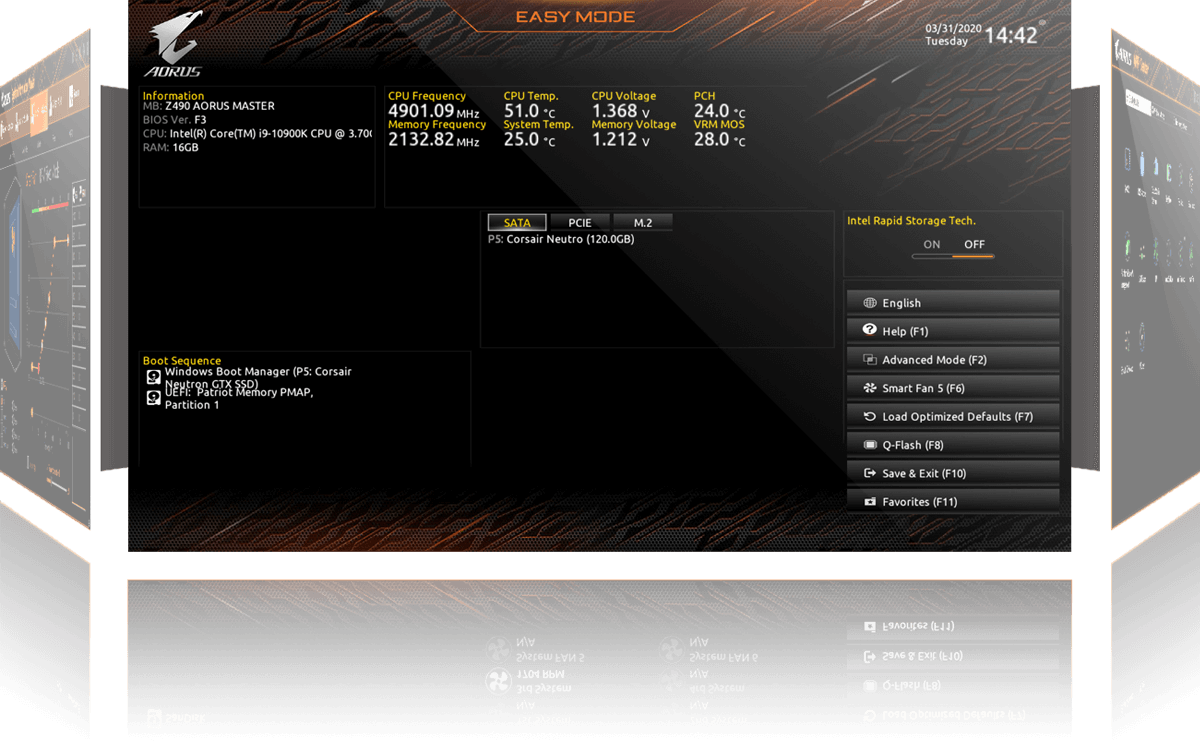
New User Interface
All new EASY MODE shows important hardware information in one page including CPU clock, Memory, Storage, Fan.
My Favorites
Add constantly used items into the favorite menu for quick access.
Storage Information
Show all kinds of storage information including SATA, PCIE and M.2 interface.
Changelog
List all changes before saving and exiting bios. Quickly review overall settings modification.
Intuitive Load Line Curve
Clearly show each loadline calibration setting in an intuitive curve graph.
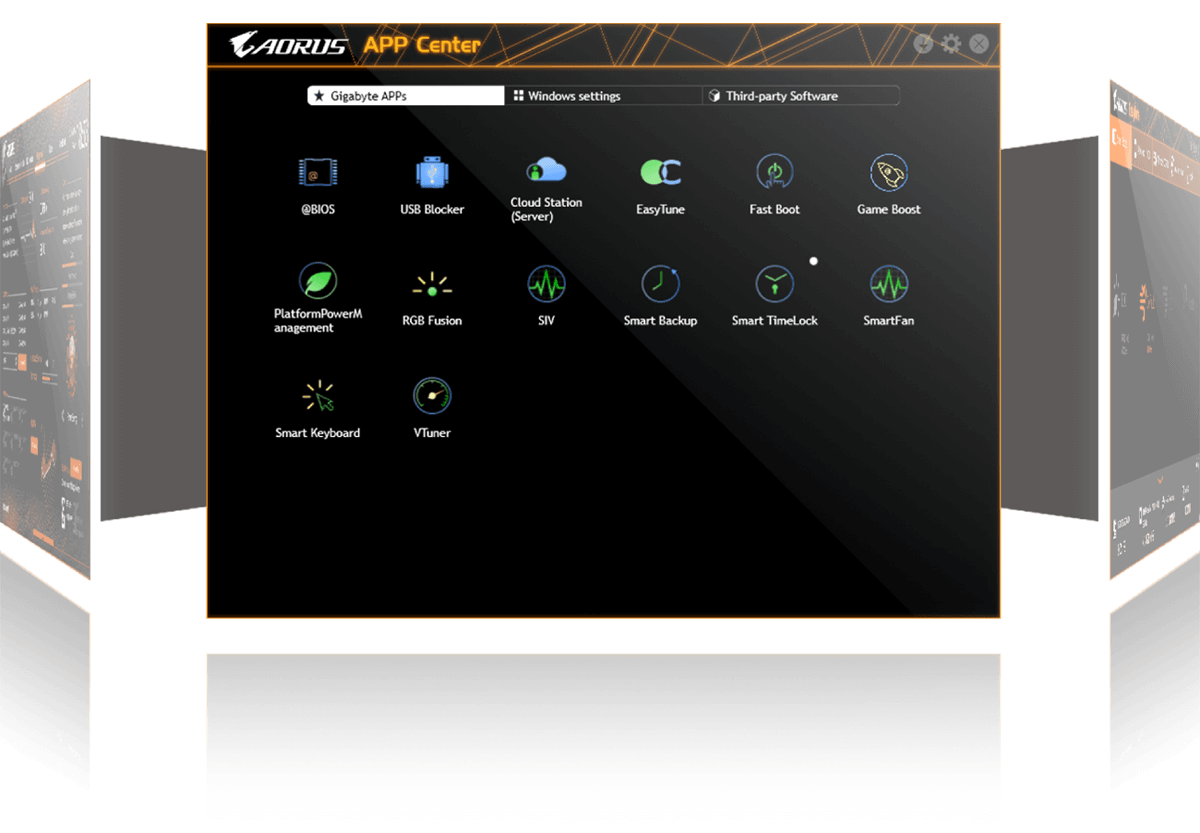
APP CENTER
GIGABYTE APP CENTER is a useful portal of all GIGABYTE MB utilities and drivers, you can choose any utility you want to install from APP CENTER and keep updated with the latest utilities and drivers version.
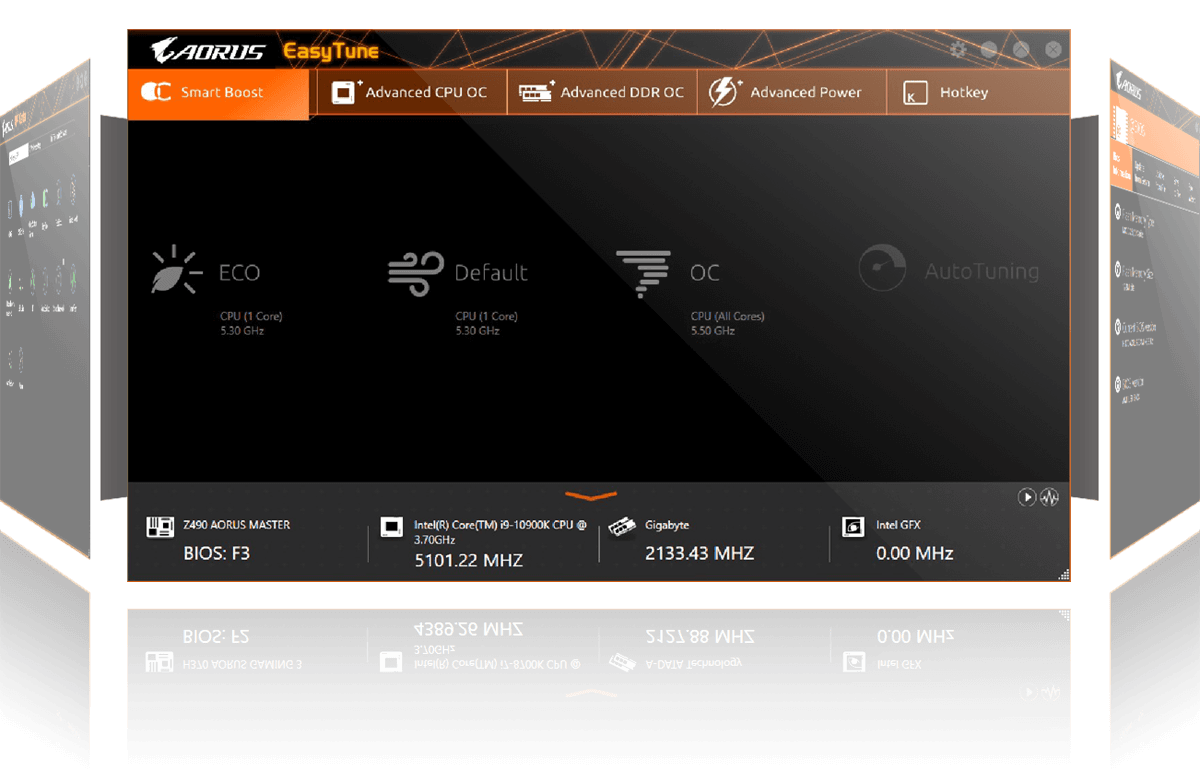
EasyTune™
GIGABYTE's EasyTune™ is a simple and easy-to-use interface that allows users to fine-tune their system settings or adjust system and memory clocks and voltages in a Windows environment. With Smart Quick Boost, one click is all it takes to automatically overclock your system, giving an added performance boost when you need it the most.
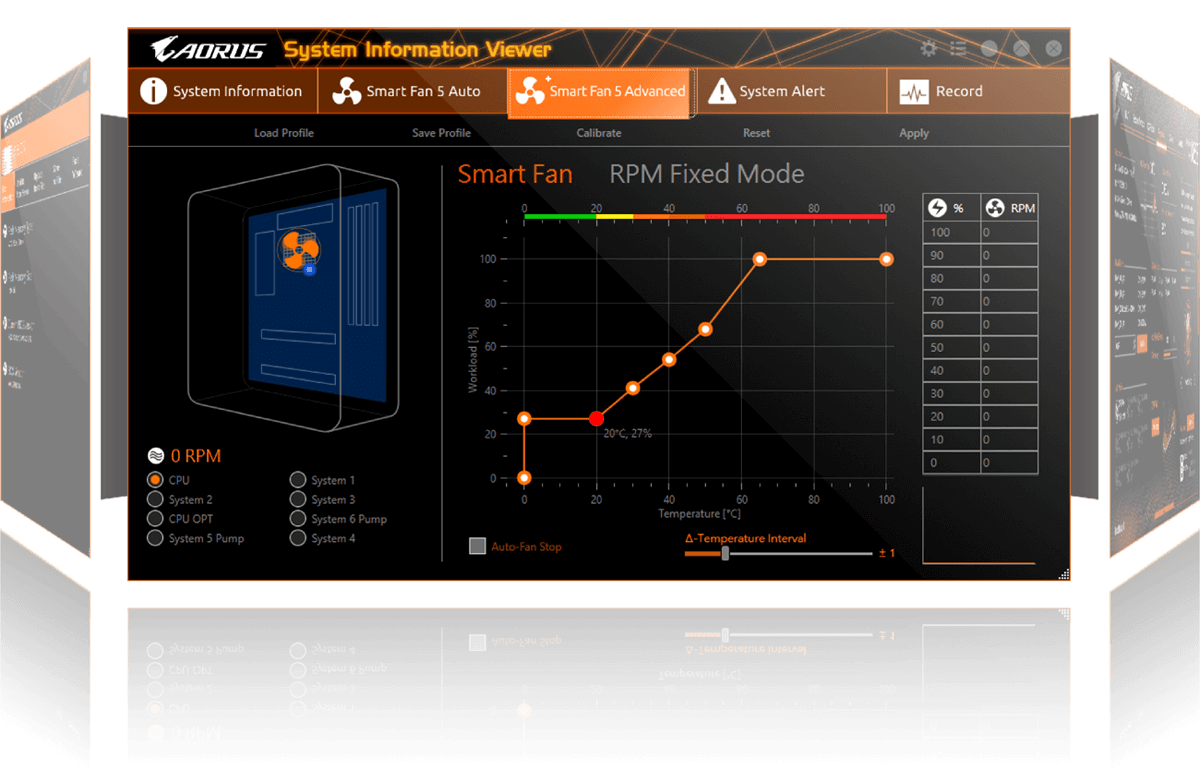
System Information Viewer
GIGABYTE System Information Viewer is a central location that gives you access to your current system status. Monitor components such as the clocks and processor, set your preferred fan speed profile, create alerts when temperatures get too high or record your system's behavior; these are the possibilities of the System Information Viewer.
LGA1200 package:
11th Generation Intel® Core™ i9 processors / Intel® Core™ i7 processors / Intel® Core™ i5 processors
10th Generation Intel® Core™ i9 processors / Intel® Core™ i7 processors / Intel® Core™ i5 processors / Intel® Core™ i3 processors/ Intel® Pentium® processors / Intel® Celeron® processors*
* Limited to processors with 4 MB Intel® Smart Cache, Intel® Celeron® G5xx5 family.
L3 cache varies with CPU
See supported processors
Chipset
Intel® B560 Express Chipset
Memory
11th Generation Intel® Core™ i9/i7/i5 processors:
Support for DDR4 3200/3000/2933/2666/2400/2133 MHz memory modules
10th Generation Intel® Core™ i9/i7 processors:
Support for DDR4 2933/2666/2400/2133 MHz memory modules
10th Generation Intel® Core™ i5/i3 /Pentium®/Celeron® processors:
Support for DDR4 2666/2400/2133 MHz memory modules
4 x DDR4 DIMM sockets supporting up to 128 GB (32 GB single DIMM capacity) of system memory
Dual channel memory architecture
Support for ECC Un-buffered DIMM 1Rx8/2Rx8 memory modules (operate in non-ECC mode)
Support for non-ECC Un-buffered DIMM 1Rx8/2Rx8/1Rx16 memory modules
Support for Extreme Memory Profile (XMP) memory modules
See supported memory
Onboard Graphics
Integrated Graphics Processor-Intel® HD Graphics support:
1 x HDMI port, supporting a maximum resolution of 4096x2160@30 Hz
* Support for HDMI 1.4 version and HDCP 2.3.
1 x DisplayPort, supporting a maximum resolution of 4096x2304@60 Hz
* Support for DisplayPort 1.2 version, HDCP 2.3
(Graphics specifications may vary depending on CPU support.)
Audio
Realtek® Audio codec
High Definition Audio
2/4/5.1/7.1-channel
LAN
Intel®2.5GbE LAN chip (2.5 Gbit/1 Gbit/100 Mbit)
Expansion Slots
1 x PCI Express x16 slot, running at x16 (PCIEX16)
* For optimum performance, if only one PCI Express graphics card is to be installed, be sure to install it in the PCIEX16 slot.
(The PCIEX16 slot conforms to PCI Express 4.0 standard.)*
*Supported by 11th Generation processors only.
1 x PCI Express x16 slot, running at x4 (PCIEX4)
1 x PCI Express x1 slot
(The PCIEX4 and PCIEX1 slots conform to PCI Express 3.0 standard.)
Multi-Graphics Technology
Support for AMD Quad-GPU CrossFire™ and 2-Way AMD CrossFire™ technologies
Storage Interface
CPU:
1 x M.2 connector (Socket 3, M key, type 2260/2280 PCIe 4.0 x4/x2 SSD support) (M2P_CPU)*
* Supported by 11th Generation processors only.
Chipset:
1 x M.2 connector on the back of the motherboard (Socket 3, M key, type 2260/2280/22110 SATA and PCIe 3.0 x4/x2 SSD support) (M2A_SB)
6 x SATA 6Gb/s connectors
* Refer to "1-7 Internal Connectors," for the installation notices for the M.2 and SATA connectors.
Intel® Optane™ Memory Ready
USB
Chipset:
1 x USB Type-C® port on the back panel, with USB 3.2 Gen2x2 support
1 x USB 3.2 Gen2 Type-A ports (red) on the back panel
2 x USB 3.2 Gen1 ports on the back panel
2 x USB 2.0/1.1 ports on the back panel
Chipset+USB 3.2 Gen 1 Hub:
1 x USB Type-C® port with USB 3.2 Gen1 support, available through the internal USB header
2 x USB 3.2 Gen1 ports available through the internal USB header
Chipset+ 2 USB 2.0 Hub:
8 x USB 2.0/1.1 ports (4 ports on the back panel, 4 ports available through the internal USB headers)
Internal I/O Connectors
1 x 24-pin ATX main power connector
1 x 8-pin ATX 12V power connector
1 x CPU fan header
1 x water cooling CPU fan header
3 x system fan headers
2 x addressable LED strip headers
2 x RGB LED strip headers
6 x SATA 6Gb/s connectors
2 x M.2 Socket 3 connectors
1 x front panel header
1 x front panel audio header
1 x USB Type-C® header, with USB 3.2 Gen 1 support
1 x USB 3.2 Gen 1 header
2 x USB 2.0/1.1 headers
2 x Thunderbolt™ add-in card connectors
1 x Trusted Platform Module header (For the GC-TPM2.0 SPI/GC-TPM2.0 SPI 2.0 module only)
1 x serial port header
1 x Clear CMOS jumper
1 x Q-Flash Plus button
*All fan headers are subject to support AIO_Pump, Pump and high performance fan with the capability of delivering up to 2A/12V @ 24W.
Back Panel Connectors
1 x PS/2 keyboard/mouse port
1 x USB Type-C® port, with USB 3.2 Gen2x2 support
1 x USB 3.2 Gen2 Type-A port (red)
2 x USB 3.2 Gen1 ports
6 x USB 2.0/1.1 ports
1 x DisplayPort
1 x HDMI port
1 x RJ-45 port
6 x audio jacks
I/O Controller
iTE® I/O Controller Chip
H/W Monitoring
Voltage detection
Temperature detection
Fan speed detection
Water cooling flow rate detection
Fan fail warning
Fan speed control
* Whether the fan speed control function is supported will depend on the cooler you install.
BIOS
1 x 256 Mbit flash
Use of licensed AMI UEFI BIOS
PnP 1.0a, DMI 2.7, WfM 2.0, SM BIOS 2.7, ACPI 5.0
Unique Features
Support for APP Center
* Available applications in APP Center may vary by motherboard model. Supported functions of each application may also vary depending on motherboard specifications.
@BIOS
EasyTune
Fast Boot
Game Boost
ON/OFF Charge
RGB Fusion
Smart Backup
System Information Viewer
Support for Q-Flash Plus
Support for Q-Flash
Support for Xpress Install
Bundled Software
Norton® Internet Security (OEM version)
cFosSpeed
Operating System
Support for Windows 10 64-bit
Form Factor
Micro ATX Form Factor; 24.4cm x 24.4cm
AORUS PRO comes with upgraded power solution, incredible cooling design, all PCIe 4.0 design and outstanding connectivity to elevate your gaming experience to the next level.
FEATURES
• Supports 11th and 10th Gen Intel® Core™ Series Processors• Dual Channel Non-ECC Unbuffered DDR4, 4 DIMMs
• Direct 12+1 Phases Digital VRM Solution with 50A DrMOS
• Shielded Memory Routing for Better Memory Overclocking
• Fully Covered Thermal Design with High Coverage MOSFET Heatsinks
• Blazing Fast Intel® 2.5GbE LAN with cFosSpeed
• Dual Ultra-Fast NVMe PCIe 4.0*/3.0 x4 M.2 with Thermal Guard
• SuperSpeed USB 3.2 Gen2x2 TYPE-C® delivers up to 20Gb/s Transfer Speeds
• Pre-installed IO Shield for Easy and Quick Installation
• RGB FUSION 2.0 with Multi-Zone Addressable LED Light Show Design, Support Addressable LED & RGB LED Strips
• Smart Fan 6 Features Multiple Temperature Sensors , Hybrid Fan Headers with FAN STOP
• Q-Flash Plus Update BIOS without Installing the CPU, Memory and Graphics Card
DIRECT POWER DESIGN
B560M AORUS motherboard uses an 12+1 phases digital CPU power design which includes both digital PWM Controller and DrMOS. These 100% digital controller and additional 8 Solid-pin CPU Power Connectors offer incredible precision in delivering power to the motherboard's most power-hungry and energy-sensitive components, allowing enthusiasts to get the absolute maximum performance from the new Intel 11th Gen CPU.
More efficient and cleaner power delivers to the CPU ensures stable performance under heavy loading.
• Digital PWM Controller to deliver appropriate voltage to the CPU.
• Direct 12+1 Phases DrMOS without PWM Doublers, each power phase connects directly to the CPU, With capability to handle 600 Amps current in total.
• All-solid capacitors to improve Transient response and minimize oscillation.
• 8 Solid Pin CPU Power Connectors.
Power Design Efficiency
ADVANCED THERMAL SOLUTION
B560M AORUS uses high performance Fully Covered thermal design with high coverage MOSFET Heatsinks and thick thermal pad, providing ultimate MOSFET cooling performance for enthusiasts, overclockers and gamers.
2X larger Surface
Increased surface area up to 2X larger compared to traditional heatsinks. It improves heat dissipation from the MOSFETs.
Real One-piece Build
TMOS is a TRUE single piece heatsink. Its one-piece design and larger surface drastically improve the cooling performance against competitors’ multi-piece design
Multi-cut Design
TMOS features several channels and inlets on the heatsink. This design allows for the air flow to go through which leads to a great improvement of the heat transfer performance.
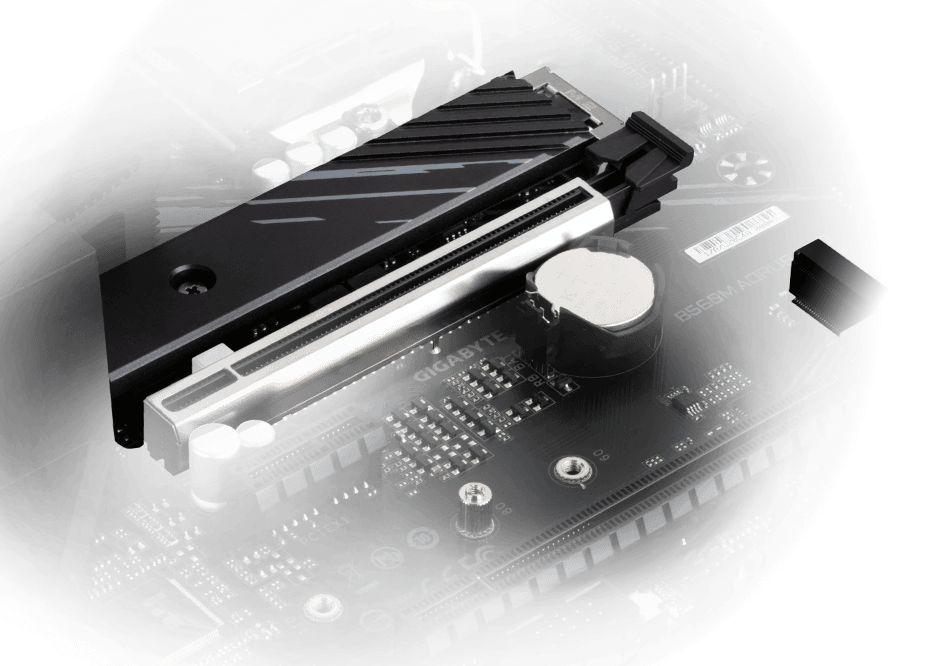
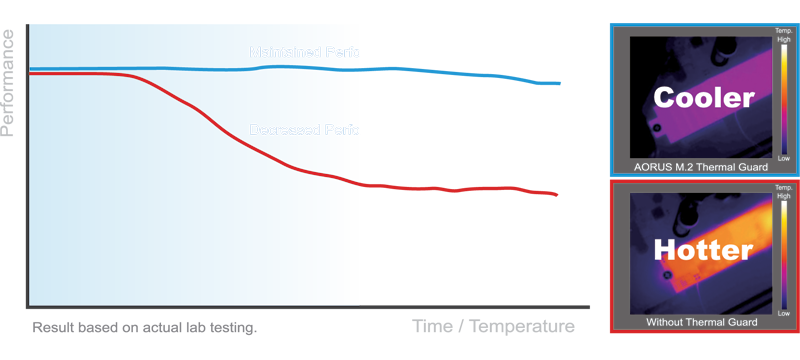
AORUS M.2 Thermal Guard
GIGABYTE Ultra-Efficient M.2 Thermal Guard
With durability in mind, GIGABYTE provides a thermal solution for M.2 SSD devices. The M.2 Thermal Guard prevents throttling and bottlenecks from high speed M.2 SSDs as it helps to dissipate heat before it becomes an issue.
Smart Fan 6
Smart Fan 6 contains several unique cooling features that ensure gaming PC maintain its performance while staying cool and quiet. Multiple fan headers can support PWM/DC fan and pump, and users can easily define each fan curve based on different temperature sensors across the board via intuitive user interface.
5 PWM/DC Fan HeadersThis sentence 6 Internal Temperature SensorsHigh Current Support
Each fan headers support PWM and DC fan and Water cooling Pump , and up to 24W (12V x 2A) with Over-Current Protection
Precision Control
Up to 7 temperature/fan speed control points for precise fan curve
Dual Curve Mode
Slope/Stair dual mode for different user scenario
Fan Stop
Fan can stop completely below users' specified temperature point
PERFORMANCE
With the best quality components and GIGABYTE R&D design capability, the B560M AORUS is a true beast among motherboards.
PCIe 4.0 M.2 Slot
M.2 PCIe 4.0 x4 slot with lower impedance.
1 x PCIe 4.0 Slot
Reinforced PCIe 4.0 x 16.
PCIe 4.0 Ready PCB
Low signal Loss PCB.
Dual PCIe 4.0/3.0 x4 M.2
GIGABYTE AORUS Motherboards are focused on delivering M.2 technology to enthusiasts who want to maximize their system's potential.
NEXT GENERATION CONNECTIVITY
Intel 2.5GbE LAN Onboard
2X Faster than ever
Adoption of 2.5G LAN provide up to 2.5 GbE network connectivity, with at least 2 times faster transfer speeds compared to general 1GbE networking, perfectly designed for gamers with ultimate online gaming experience.
Support Multi-Gig(10/100/1000/2500Mbps) RJ-45 ethernet
USB Type-C® Front Panel Connector
Equipped with next generation connectivity AORUS Motherboards already support the chassis of the future. The onboard USB Type-C® header for USB 3.2 Gen1 makes access convenient when connecting a USB 3.2 Gen1 drive or charging your new mobile device.
High Quality Onboard Audio Design
Delivers high quality sound resolution and sound expansion to create the most realistic sound effects for professional gamers.
DEFINITIVE AESTHETICS
B560M AORUS PRO features RGB FUSION 2.0 and offers users the option to control onboard, external light strips, and/or AORUS devices with RGB/ Addressable RGB LEDs to make their PC more unique and stylish.
Multi-Zone Light Show Design
Now offering more LED customizations than ever, users can truly adapt their PC to represent their lifestyle. With full RGB support and a redesigned RGB Fusion 2.0 application, the user has complete control over the LEDs which surround the motherboard.
With an integrated intuitive user interface, the RGB Fusion 2.0 provides you a better solution for customizing the lighting effects across all supported devices. From motherboards, graphics cards to the peripheral products, you can personalize your gaming rig with your own style and show off your build by sharing the profiles. In addition, the new gaming mode makes the lighting effects interactive with selected games to bring you the most immersive gaming experience.
GIGABYTE RGB Fusion APP
Don't just make your PC shine, make it a work of art that friends will envy. With the GIGABYTE RGB Fusion mobile app users can watch as they control the lighting within their gaming PC. This gives users ease of access as they try and adjust colors and speeds for different modes, all this can be achieved away from the keyboard and monitor of their PC.
ULTRA DURABLE
GIGABYTE is reputable for its product durability and high quality manufacturing process. Needless to say, we use the best components we can find for the B560M AORUS motherboard and reinforce every slot to make each of them solid and durable.
Q-Flash Plus
Update the BIOS easily without installing the CPU, memory and graphics card.
With GIGABYTE Q-Flash Plus, you don’t need to install the CPU, memory and graphics card nor enter the BIOS menu to flash the BIOS. Just download and save a new BIOS file (rename to gigabyte.bin) on the USB flash drive, then press the dedicated Q-Flash Plus button and you’re good to go!
Ultra Durable™ PCIe Armor
Industry Leading Ultra Durable™ PCIe Armor
The innovative one piece stainless steel shielding design from GIGABYTE reinforces the PCIe connectors to provide the extra strength required to support heavy graphics cards.
GIGABYTE Patented Double Locking Bracket
Solid Pin Power Connectors
AORUS motherboards feature solid plated ATX 12V 8pin power connectors to offer a stable power supply during CPU overloading.
Solid Pin Power connector advantages
Larger contact area for electricity
More metal quantity to sustain higher power and generated heat
Ultra durable and longer lifespan
GIGABYTE BIOS & APP CENTER
Good software goes hand in hand with perfect hardware. GIGABYTE motherboard bundled several useful and intuitive software to help users to control every aspect of motherboard.
New User Interface
All new EASY MODE shows important hardware information in one page including CPU clock, Memory, Storage, Fan.
My Favorites
Add constantly used items into the favorite menu for quick access.
Storage Information
Show all kinds of storage information including SATA, PCIE and M.2 interface.
Changelog
List all changes before saving and exiting bios. Quickly review overall settings modification.
Intuitive Load Line Curve
Clearly show each loadline calibration setting in an intuitive curve graph.
APP CENTER
GIGABYTE APP CENTER is a useful portal of all GIGABYTE MB utilities and drivers, you can choose any utility you want to install from APP CENTER and keep updated with the latest utilities and drivers version.
EasyTune™
GIGABYTE's EasyTune™ is a simple and easy-to-use interface that allows users to fine-tune their system settings or adjust system and memory clocks and voltages in a Windows environment. With Smart Quick Boost, one click is all it takes to automatically overclock your system, giving an added performance boost when you need it the most.
System Information Viewer
GIGABYTE System Information Viewer is a central location that gives you access to your current system status. Monitor components such as the clocks and processor, set your preferred fan speed profile, create alerts when temperatures get too high or record your system's behavior; these are the possibilities of the System Information Viewer.
TECHNICAL SPECS
CPULGA1200 package:
11th Generation Intel® Core™ i9 processors / Intel® Core™ i7 processors / Intel® Core™ i5 processors
10th Generation Intel® Core™ i9 processors / Intel® Core™ i7 processors / Intel® Core™ i5 processors / Intel® Core™ i3 processors/ Intel® Pentium® processors / Intel® Celeron® processors*
* Limited to processors with 4 MB Intel® Smart Cache, Intel® Celeron® G5xx5 family.
L3 cache varies with CPU
See supported processors
Chipset
Intel® B560 Express Chipset
Memory
11th Generation Intel® Core™ i9/i7/i5 processors:
Support for DDR4 3200/3000/2933/2666/2400/2133 MHz memory modules
10th Generation Intel® Core™ i9/i7 processors:
Support for DDR4 2933/2666/2400/2133 MHz memory modules
10th Generation Intel® Core™ i5/i3 /Pentium®/Celeron® processors:
Support for DDR4 2666/2400/2133 MHz memory modules
4 x DDR4 DIMM sockets supporting up to 128 GB (32 GB single DIMM capacity) of system memory
Dual channel memory architecture
Support for ECC Un-buffered DIMM 1Rx8/2Rx8 memory modules (operate in non-ECC mode)
Support for non-ECC Un-buffered DIMM 1Rx8/2Rx8/1Rx16 memory modules
Support for Extreme Memory Profile (XMP) memory modules
See supported memory
Onboard Graphics
Integrated Graphics Processor-Intel® HD Graphics support:
1 x HDMI port, supporting a maximum resolution of 4096x2160@30 Hz
* Support for HDMI 1.4 version and HDCP 2.3.
1 x DisplayPort, supporting a maximum resolution of 4096x2304@60 Hz
* Support for DisplayPort 1.2 version, HDCP 2.3
(Graphics specifications may vary depending on CPU support.)
Audio
Realtek® Audio codec
High Definition Audio
2/4/5.1/7.1-channel
LAN
Intel®2.5GbE LAN chip (2.5 Gbit/1 Gbit/100 Mbit)
Expansion Slots
1 x PCI Express x16 slot, running at x16 (PCIEX16)
* For optimum performance, if only one PCI Express graphics card is to be installed, be sure to install it in the PCIEX16 slot.
(The PCIEX16 slot conforms to PCI Express 4.0 standard.)*
*Supported by 11th Generation processors only.
1 x PCI Express x16 slot, running at x4 (PCIEX4)
1 x PCI Express x1 slot
(The PCIEX4 and PCIEX1 slots conform to PCI Express 3.0 standard.)
Multi-Graphics Technology
Support for AMD Quad-GPU CrossFire™ and 2-Way AMD CrossFire™ technologies
Storage Interface
CPU:
1 x M.2 connector (Socket 3, M key, type 2260/2280 PCIe 4.0 x4/x2 SSD support) (M2P_CPU)*
* Supported by 11th Generation processors only.
Chipset:
1 x M.2 connector on the back of the motherboard (Socket 3, M key, type 2260/2280/22110 SATA and PCIe 3.0 x4/x2 SSD support) (M2A_SB)
6 x SATA 6Gb/s connectors
* Refer to "1-7 Internal Connectors," for the installation notices for the M.2 and SATA connectors.
Intel® Optane™ Memory Ready
USB
Chipset:
1 x USB Type-C® port on the back panel, with USB 3.2 Gen2x2 support
1 x USB 3.2 Gen2 Type-A ports (red) on the back panel
2 x USB 3.2 Gen1 ports on the back panel
2 x USB 2.0/1.1 ports on the back panel
Chipset+USB 3.2 Gen 1 Hub:
1 x USB Type-C® port with USB 3.2 Gen1 support, available through the internal USB header
2 x USB 3.2 Gen1 ports available through the internal USB header
Chipset+ 2 USB 2.0 Hub:
8 x USB 2.0/1.1 ports (4 ports on the back panel, 4 ports available through the internal USB headers)
Internal I/O Connectors
1 x 24-pin ATX main power connector
1 x 8-pin ATX 12V power connector
1 x CPU fan header
1 x water cooling CPU fan header
3 x system fan headers
2 x addressable LED strip headers
2 x RGB LED strip headers
6 x SATA 6Gb/s connectors
2 x M.2 Socket 3 connectors
1 x front panel header
1 x front panel audio header
1 x USB Type-C® header, with USB 3.2 Gen 1 support
1 x USB 3.2 Gen 1 header
2 x USB 2.0/1.1 headers
2 x Thunderbolt™ add-in card connectors
1 x Trusted Platform Module header (For the GC-TPM2.0 SPI/GC-TPM2.0 SPI 2.0 module only)
1 x serial port header
1 x Clear CMOS jumper
1 x Q-Flash Plus button
*All fan headers are subject to support AIO_Pump, Pump and high performance fan with the capability of delivering up to 2A/12V @ 24W.
Back Panel Connectors
1 x PS/2 keyboard/mouse port
1 x USB Type-C® port, with USB 3.2 Gen2x2 support
1 x USB 3.2 Gen2 Type-A port (red)
2 x USB 3.2 Gen1 ports
6 x USB 2.0/1.1 ports
1 x DisplayPort
1 x HDMI port
1 x RJ-45 port
6 x audio jacks
I/O Controller
iTE® I/O Controller Chip
H/W Monitoring
Voltage detection
Temperature detection
Fan speed detection
Water cooling flow rate detection
Fan fail warning
Fan speed control
* Whether the fan speed control function is supported will depend on the cooler you install.
BIOS
1 x 256 Mbit flash
Use of licensed AMI UEFI BIOS
PnP 1.0a, DMI 2.7, WfM 2.0, SM BIOS 2.7, ACPI 5.0
Unique Features
Support for APP Center
* Available applications in APP Center may vary by motherboard model. Supported functions of each application may also vary depending on motherboard specifications.
@BIOS
EasyTune
Fast Boot
Game Boost
ON/OFF Charge
RGB Fusion
Smart Backup
System Information Viewer
Support for Q-Flash Plus
Support for Q-Flash
Support for Xpress Install
Bundled Software
Norton® Internet Security (OEM version)
cFosSpeed
Operating System
Support for Windows 10 64-bit
Form Factor
Micro ATX Form Factor; 24.4cm x 24.4cm
You might also like


